

Social interactions — reactions, comments, bookmarks, recently read
Open Intranet ships four lightweight engagement primitives that show up on every piece of content the site publishes: a one-click reaction (👍 I like this), threaded comments, a personal bookmark, and an automatic recently read list. Together they turn the intranet from a static document store into a place where employees actually interact with each other and with the content.
This page covers all four. They are documented together because they share the same mental model — user X did Y on item Z — and the same admin plumbing (the Flag module).
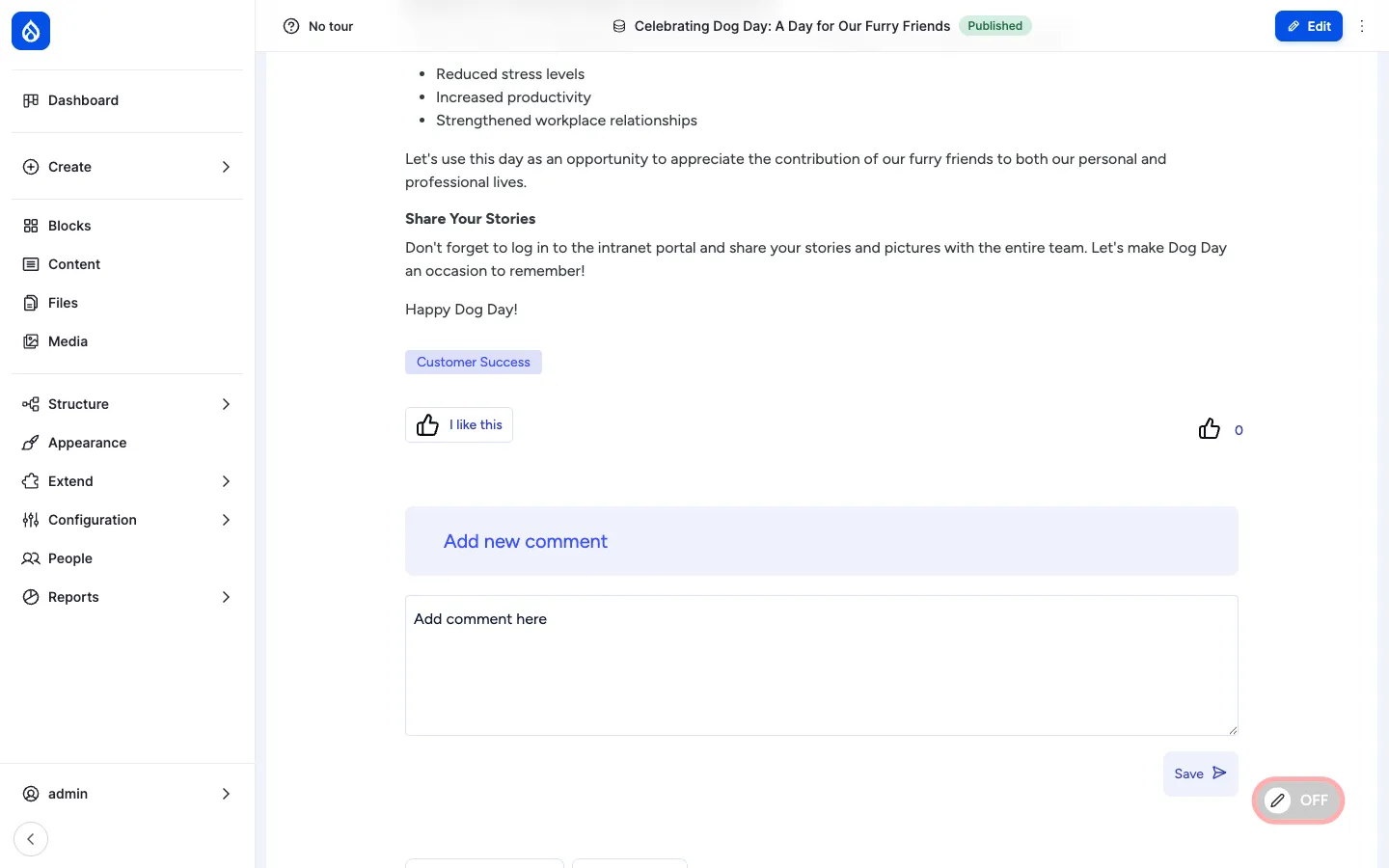
Reactions
Section titled “Reactions”What it is
Section titled “What it is”Reactions are one-click feedback signals on a piece of content. Open Intranet uses Voting API plus Voting API Reaction for this — the field is configurable, supports any number of emoji and shows live counts.
Out of the box every News article, KB page, page, document and event exposes a single I like this 👍 reaction. The button toggles: click once to vote, click again to retract. Counts update without a page reload.
Where it lives
Section titled “Where it lives”A reaction field is added to each enabled bundle. The default field is field_news_article_reaction on News, and similarly named fields on other types. Field UI exposes the underlying widget and lets a site builder swap the emoji set or add a second reaction field (e.g. Helpful, Confused on KB pages).
Per-bundle counts and lists
Section titled “Per-bundle counts and lists”Every reaction is stored as a row in votingapi_vote. That means views can list:
- Most-liked News this week
- Articles you have liked
- Top reactors (used by the Engagement scoring feature)
The default install ships Most-liked News this week on the homepage and Articles you have liked on the user dashboard.
Permissions
Section titled “Permissions”| Permission | Default role(s) |
|---|---|
| Vote on content (cast / retract a reaction) | Authenticated user |
| View reaction counts | Anonymous + Authenticated |
| Administer voting (change emoji set, manage votes) | Administrator |
Comments
Section titled “Comments”What it is
Section titled “What it is”Comments use Drupal core’s Comment module. Open Intranet enables them on News, Events, KB pages and Pages.
A comment is a content entity: it has its own subject + body, an author, a timestamp, a parent (for threading) and a status (published / unpublished / pending). Comments can be edited and deleted; deletion creates a tombstone so threads stay readable.
Where it lives
Section titled “Where it lives”Each enabled content type renders an Add new comment form below the main content, followed by the comment thread:
- Threaded — replies indent under their parent.
- Pagination — long threads paginate (default: 50 comments per page).
- Email notifications — an admin-configurable subscription system sends a digest to subscribers when a new comment is posted (off by default).
- Editor — comments use the same CKEditor 5 instance as the parent content, so authors can format text, embed images, paste tables, and use the AI assistant.
Moderation
Section titled “Moderation”The administrator can:
- Approve / unpublish a comment from the Moderate comments report at
/admin/content/comment. - Delete a comment outright (a comment can also be deleted by its author).
- Configure per-content-type defaults — closed / open / hidden — at the content type’s Comments tab.
- Permanently disable comments on a specific item by switching its Comment widget to Closed on the edit form.
Permissions
Section titled “Permissions”| Permission | Default role(s) |
|---|---|
| Post comments | Authenticated user |
| Skip comment approval (auto-publish) | Authenticated user (configurable) |
| Edit own comments | Authenticated user |
| Administer comments and comment settings | Administrator |
| View comments | Anonymous + Authenticated |
Bookmarks
Section titled “Bookmarks”What it is
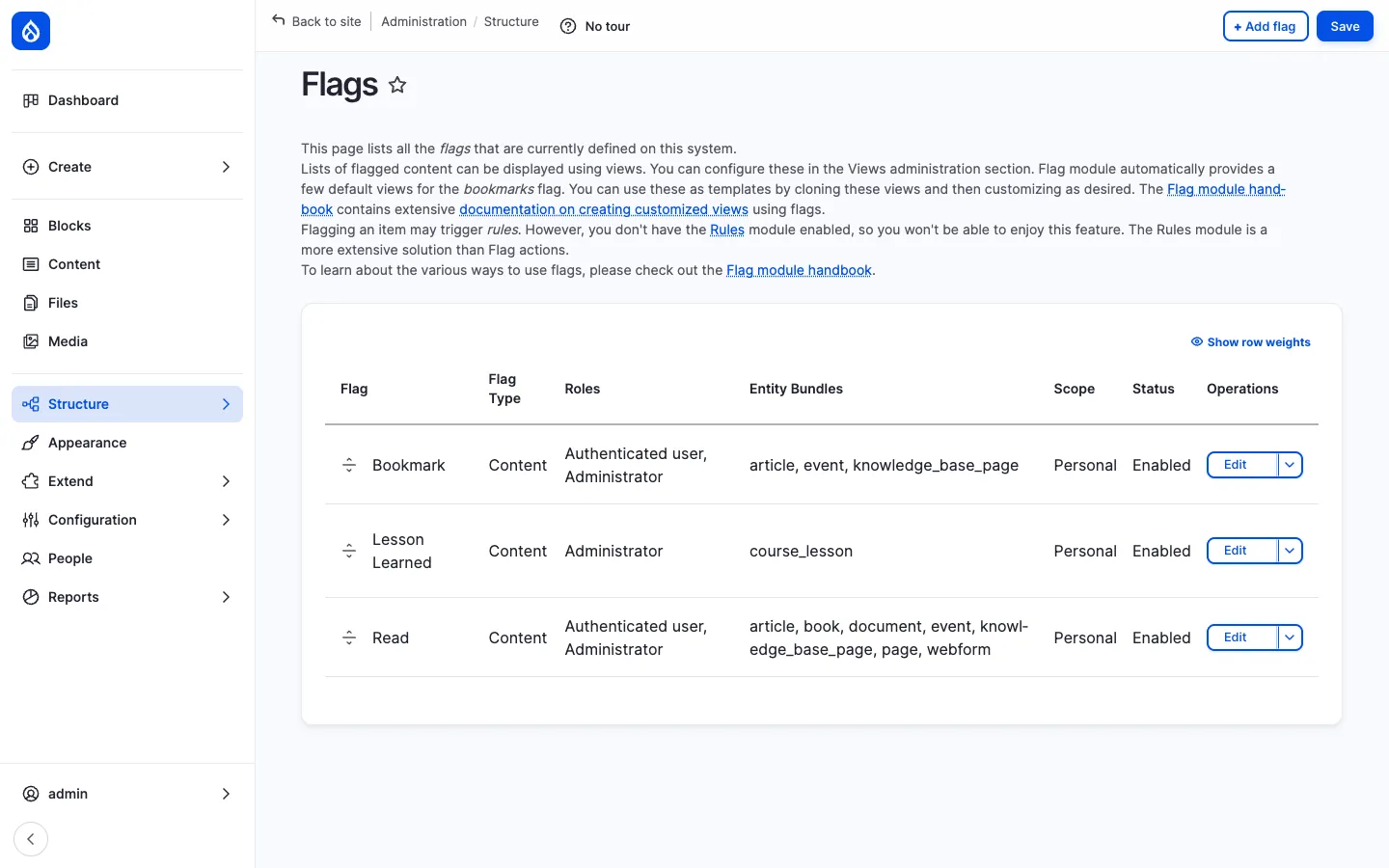
Section titled “What it is”Bookmarks are personal save-for-later flags. Open Intranet uses the Flag module’s Bookmark flag, with Personal scope — every user has their own list, no one else can see it.
The flag is enabled for News articles, Events and Knowledge Base pages:
Where it lives
Section titled “Where it lives”Each item exposes a Bookmark this link. Click once to bookmark, click again to remove. The bookmark count is per-user; there is no public “bookmarks” counter on a page.
A user’s list lives at /bookmarks:
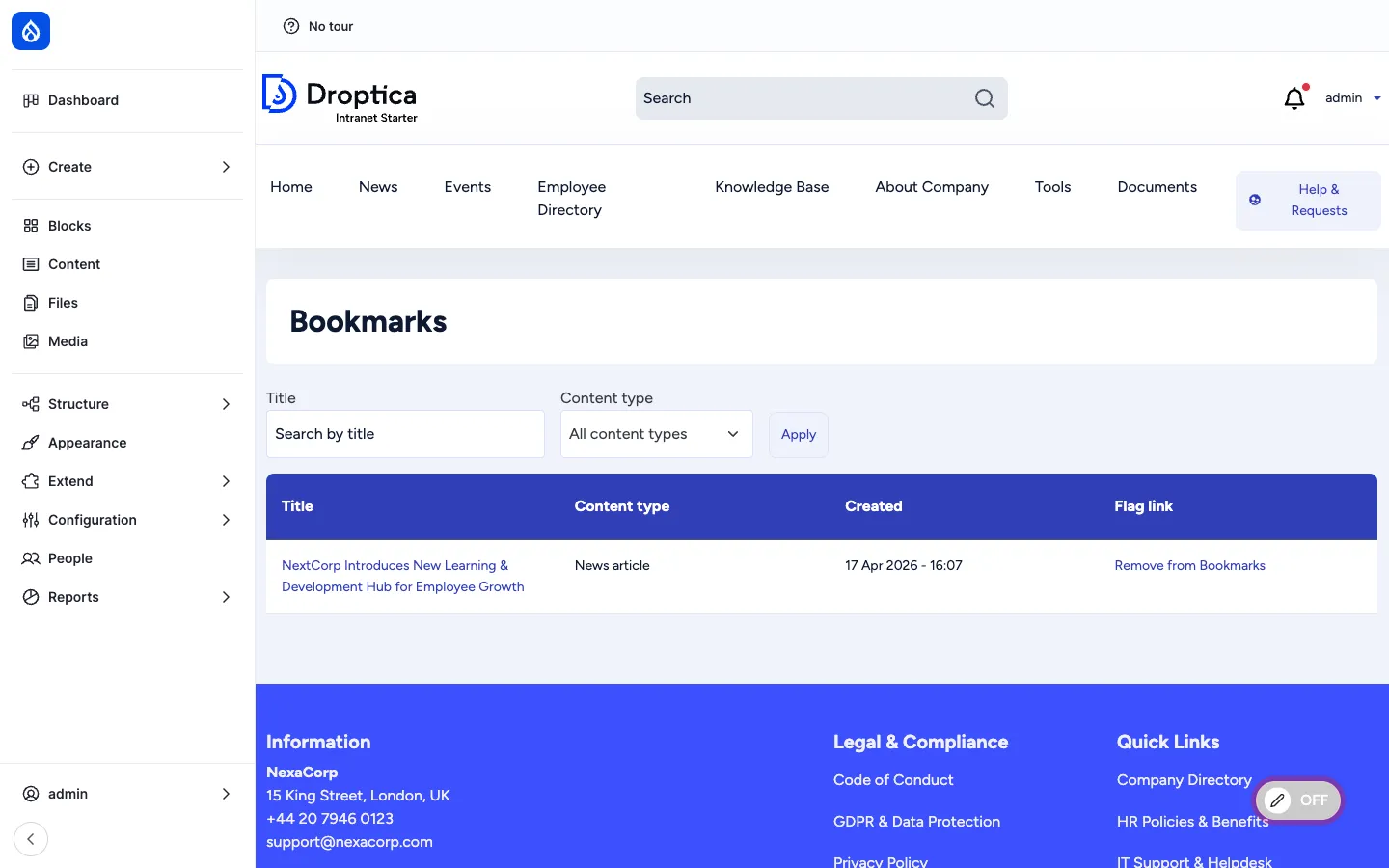
The page is a Drupal view with two filters (title search, content type) and a table layout. Each row offers a one-click Remove from Bookmarks link that operates without leaving the page.
A small My bookmarks link is also added to the main navigation (anywhere bookmarks are enabled).
Permissions
Section titled “Permissions”| Permission | Default role(s) |
|---|---|
| Use the Bookmark flag | Authenticated user |
| Administer flags (create new flags, change scope, edit fields) | Administrator |
Recently read
Section titled “Recently read”What it is
Section titled “What it is”Recently read is an implicit engagement signal. Where bookmarking is an explicit action, recently read records the fact that a user opened a page. It is provided by the Recently Read module.
Every time an authenticated user views a piece of content, an entry is written to recently_read_item. Open Intranet enables this for News articles, Events, KB pages, Pages and Documents.
Where it lives
Section titled “Where it lives”Recently read is exposed as a block (via the recently_read_content view) — it lives in the user dashboard and can be placed by a site builder anywhere a sidebar is available. The block lists the N most recent items the current user opened, with title, type and timestamp.
The same data feeds:
- Engagement scoring — recently-read counts are part of a user’s engagement score on their profile.
- Personalised search and recommendations — More like the things you have read style blocks.
Lifecycle
Section titled “Lifecycle”Each recently-read entry has a TTL (default: 30 days, configurable per bundle). After the TTL expires, cron prunes the entry. The list also de-duplicates: opening the same page twice updates the timestamp instead of adding a new row.
Permissions
Section titled “Permissions”| Permission | Default role(s) |
|---|---|
| View own recently-read items | Authenticated user |
| Administer Recently Read (TTL, enabled bundles) | Administrator |
How they work together
Section titled “How they work together”Together these four primitives feed the engagement layer:
- Reactions — explicit, public, one-click positive feedback.
- Comments — explicit, public, multi-line conversation.
- Bookmarks — explicit, private, save-for-later.
- Recently read — implicit, private, track-what-you-saw.
This data is the input to:
- The Engagement score on each employee profile.
- The Most engaged content this week dashboard block.
- The “People who read this also read” recommendations.
- The Must Read report’s who-actually-read-it check (recently-read is treated as a “read” signal alongside the explicit Read flag).
Integration with other features
Section titled “Integration with other features”- News, Events, KB pages, Pages, Documents — All enabled for one or more of the four primitives.
- Engagement scoring — Reactions, comments and recently-read are inputs to the score.
- Employee Directory — Each profile shows an engagement strip (reactions cast, comments posted, bookmarks).
- Search — Personalised re-ranking can use bookmark + recently-read signals.
- Must Read tracking — Reads (explicit Flag + recently-read) are counted toward the Must Read report.
- Access Control & Groups — Bookmarks and recently-read lists are filtered through the access checker, so a user never sees an item they no longer have access to.
Modules behind it
Section titled “Modules behind it”- Voting API + Voting API Reaction — reactions
- Drupal core:
comment— comments - Flag — bookmarks (Bookmark flag) and Read tracking (Read flag)
- Recently Read — implicit read history
openintranet_engagement— composite engagement score that aggregates the above
Learn more
Section titled “Learn more”- News and Articles — heaviest user of reactions and comments
- Knowledge Base — KB pages enable the same primitives
- Must Read tracking — uses the Read flag and recently-read as evidence
- Employee Directory — engagement scoring derived from these primitives