

Access Control & Groups
The Access Control & Groups layer (provided by openintranet_access) is what lets Open Intranet model a real organisation. Administrators define a tree of OI Groups — the company, its offices, the departments inside each office, the teams inside each department — and then any folder, document or selected node type can be restricted to one or more of those groups (or to specific users on top). Group hierarchy is enforced: granting access to Berlin Office automatically grants every team underneath without having to tick them one by one.
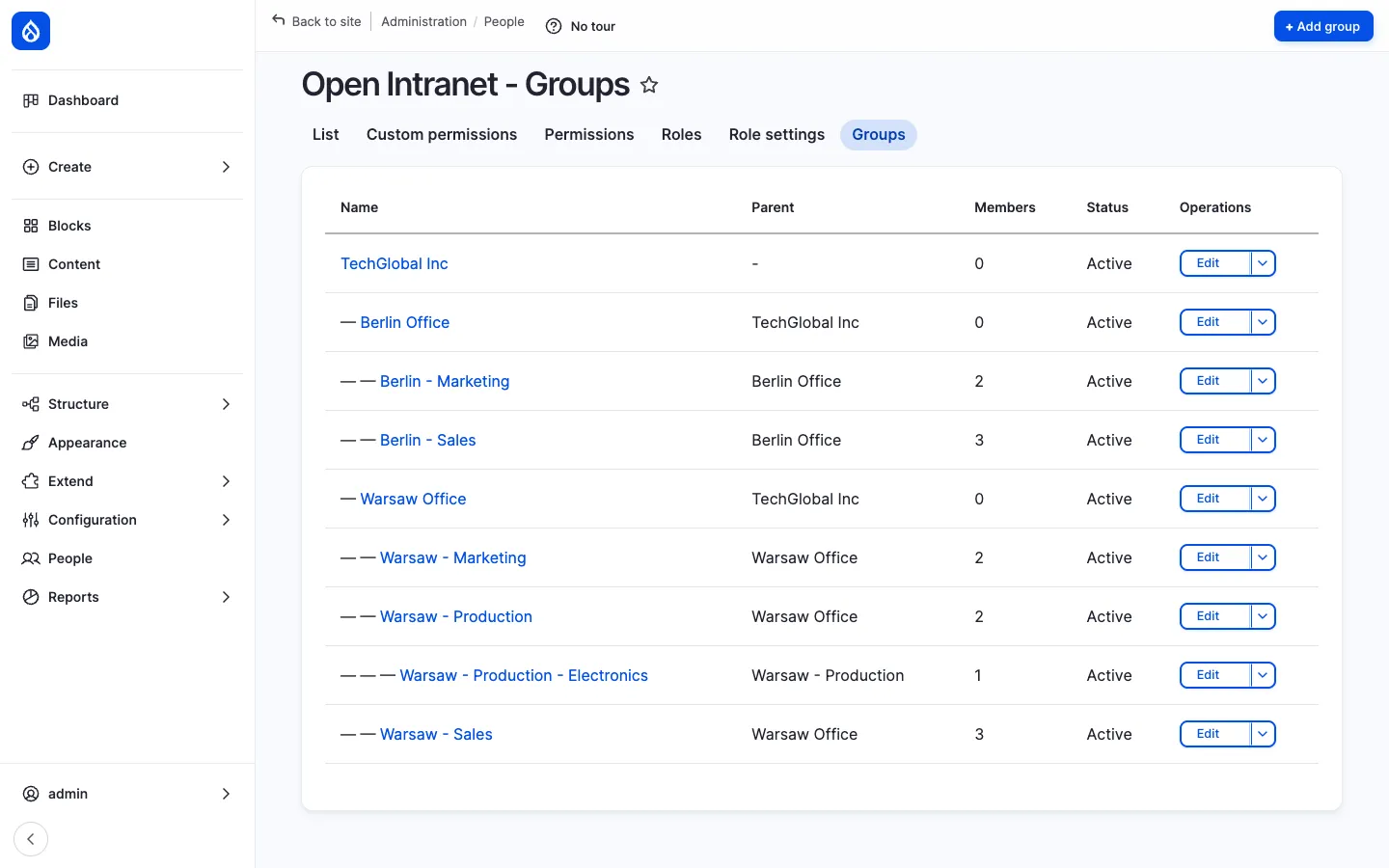
What it is
Section titled “What it is”openintranet_access adds three things to the platform:
- The
oi_groupcontent entity — a hierarchical group with a name, description, parent group and status. Groups are full Drupal entities, with their own URL, permissions and Field UI. - The Access form — a single reusable form that adds an Access tab to every folder, document and any node type enabled in Access settings. Pick which groups and / or which individual users should see the item.
- An access checker service — a runtime hook that filters listings (search results, folder browsers, related-content blocks) so restricted items disappear for users who do not pass the check.
The result is a flexible, plain-language permissions story: “the Annual Report 2025 is restricted to Finance, with Sophie Dupont added as an exception” — and that single sentence is enforceable everywhere on the site.
Components
Section titled “Components”The OI Group entity
Section titled “The OI Group entity”Each group has:
| Field | Purpose |
|---|---|
| Name | Display name (e.g. Berlin - Sales). |
| Description | Optional free-form description. |
| Parent | Reference to another group. Empty for root groups. |
| Status | Active / inactive. Inactive groups stop granting access. |
The standard Drupal entity capabilities are all there — fields can be added through Field UI, view modes are configurable, revisions are supported.
The group hierarchy
Section titled “The group hierarchy”Groups form a tree. There is no limit on depth. The example below uses two levels of organisation under a single root:
TechGlobal Inc ← root├── Berlin Office│ ├── Berlin - Marketing│ └── Berlin - Sales└── Warsaw Office ├── Warsaw - Marketing ├── Warsaw - Production │ └── Warsaw - Production - Electronics └── Warsaw - SalesHierarchy is rendered in the admin list with indentation, and on the Access form as a nested checkbox tree.
The inheritance rule is:
If you tick Warsaw Office, every user who is a member of Warsaw Office or of any of its descendants — Warsaw - Marketing, Warsaw - Sales, Warsaw - Production, Warsaw - Production - Electronics — gets access.
This means administrators usually pick the highest group that should have access and let the hierarchy do the rest. There is no need to tick every leaf group separately.
The Access form
Section titled “The Access form”Every folder, document and Access-enabled node type has an Access tab:
- Folder:
/documents/folder/{id}/access - Document:
/documents/document/{id}/access - Node:
/node/{nid}/openintranet-access
The form has two input sections plus a live summary:
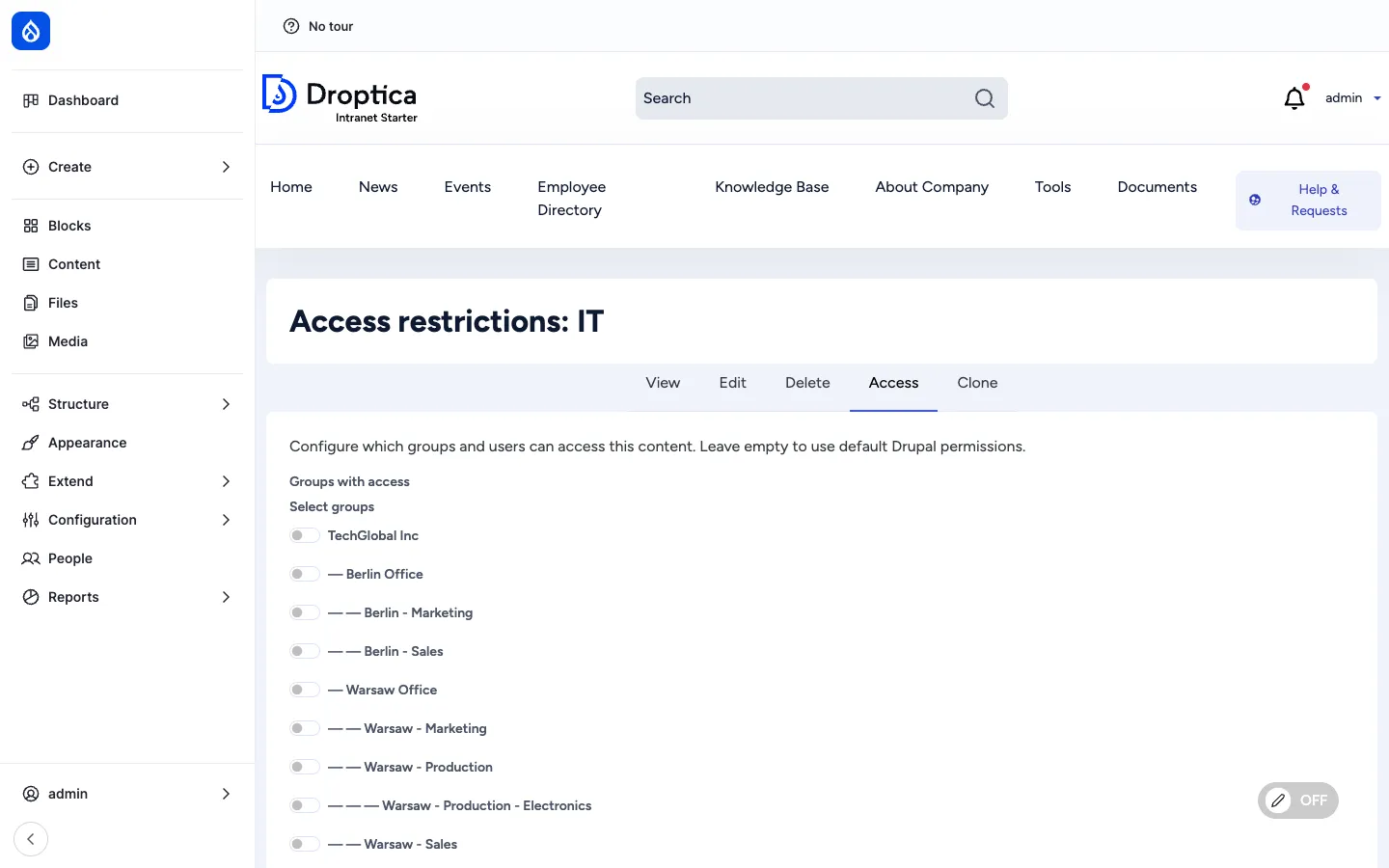
- Groups with access — Nested checkbox list of every OI Group on the site. Hierarchy shown by indentation. Tick a group to grant its members access; subgroups automatically inherit through the rule above.
- Individual users with access — Free-form autocomplete picker for users who should have access regardless of their group memberships. Useful for one-off exceptions — a contractor who needs to see a single document, or the project manager who is not formally in the team but should still be in the loop.
Listed users are added on top of the group rules, not in place of them.
Folder-to-document inheritance
Section titled “Folder-to-document inheritance”Restrictions on a folder cascade to the documents inside it unless the document explicitly overrides them. So restricting the Finance folder is enough to restrict every document inside Finance — no need to set the Access tab on each file.
A document’s effective access is therefore: (group rules on the document) ∪ (group rules on the parent folder) — read as a union. To loosen access for a specific document inside a restricted folder, just tick a wider group on that document’s Access tab.
Access settings
Section titled “Access settings”/admin/config/people/openintranet-access is where the administrator chooses which entity bundles get the Access tab.
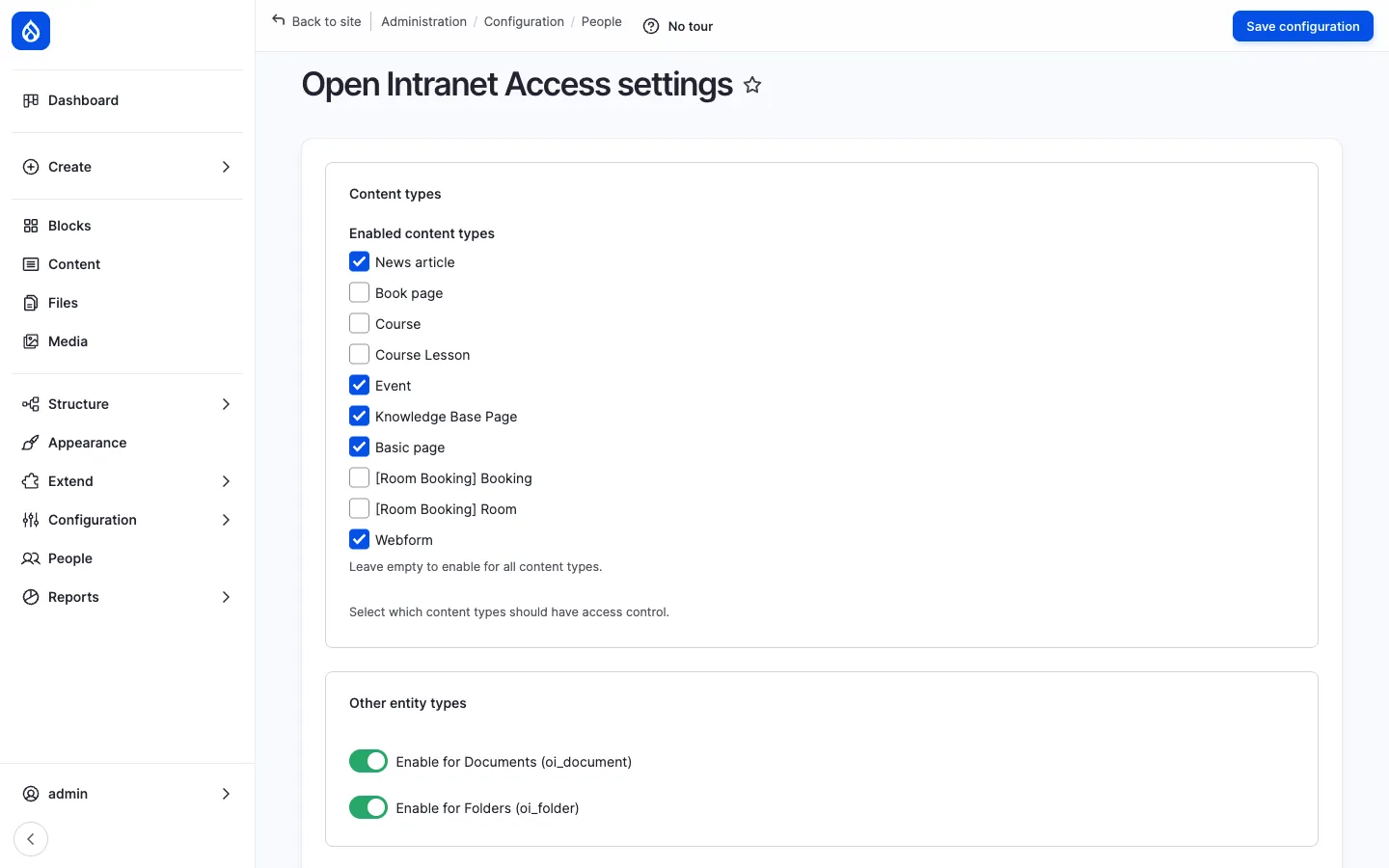
Folders and documents are always Access-aware (they are the most common case). Node types (article, page, knowledge_base_page, event, etc.) are opt-in: tick a checkbox to add the Access tab to that type. Only ticked types have per-item restrictions.
This page also exposes the bypass options — which roles can see every item regardless of restrictions (typically only the Administrator role).
Group membership management
Section titled “Group membership management”Group membership is managed at /admin/people/oi-groups/{id}/members. The page has two halves: Current members (checkboxed list with Remove selected) and Add members (autocomplete that accepts a comma-separated list of usernames). A user can belong to any number of groups — there is no limit.
Listing-level enforcement
Section titled “Listing-level enforcement”Access is enforced at the listing level, not just on the entity page. That means restricted folders, documents and KB pages disappear from:
- The folder browser at
/documents - Search results
- Related-content blocks
- Recently-read lists
- Bookmark lists
- The KB sidebar tree
A user who lacks access never sees a “denied” message — for them the item simply does not exist. This is the right default for an intranet where leakage of the existence of a confidential file (e.g. a redundancy plan) can itself be sensitive.
The full administration walkthrough — bypass roles, audit logs, access-by-group reports — is on the Documents administration page.
Access checker service
Section titled “Access checker service”For programmatic use:
$checker = \Drupal::service('openintranet_access.access_checker');
// Yes/no question:$checker->canAccess($entity, $account); // bool
// Who has access to an entity?$users = $checker->getAccessibleUsers($entity); // User[]
// Which entities can a user access?$entities = $checker->getAccessibleEntities('oi_document', $account); // EntityInterface[]
This is the same service the runtime hook calls before rendering each listing.
Integration with other features
Section titled “Integration with other features”- Documents — Folders and documents always have the Access tab. The full permissions story for the file library is on Documents administration.
- Knowledge Base — KB pages have an opt-in Access tab; admin enables it from Access settings.
- News, Events, Pages — Any node type can be enabled for Access; once enabled it gets the per-item Access tab.
- Search — Restricted entities are filtered out of search results before they are rendered.
- Recently Read & Bookmarks — Both filter their lists through the access checker, so a user never sees a recent item or bookmark they no longer have access to.
- Engagement scoring — Engagement only counts events on entities the user actually accessed.
- Messenger — A future channel plugin can resolve recipients via OI Group membership (e.g. “all active users in Berlin Office and its descendants”).
Permissions
Section titled “Permissions”| Permission | Default role(s) |
|---|---|
| Administer OpenIntranet Access (settings page) | Administrator |
| View any group | Authenticated user |
| Manage group members | Administrator (and a dedicated Group manager role you can create) |
| Set entity access (use the Access tab on a folder / document / node) | Content editor + the entity’s owner |
| Bypass OI Access checks (see everything) | Administrator |
| View user access info page | Administrator |
Modules behind it
Section titled “Modules behind it”openintranet_access— entity, services, Access form, checker- Drupal core:
entity,field,views,user flexible_permissions— granular permission scopes used by the bypass / set-access permissions
Learn more
Section titled “Learn more”- Documents administration — the full permissions story applied to folders and documents
- Documents — the file library that uses this layer most heavily
- Knowledge Base — KB pages with opt-in per-page restrictions
- Employee Directory — user profiles and the user model that backs group membership