

ECA — no-code workflows
The Events, Conditions, Actions (ECA) module is Open Intranet’s no-code workflow engine. It lets administrators define automated behaviour for almost anything that happens on the site — when a News article is published, send an email; when a comment is posted, check toxicity; when a webform is submitted, create a task and notify the manager — using a graphical BPMN.io modeller. There is no PHP to write, no module to scaffold, no .module file to deploy.
ECA is what fills the gap between out-of-the-box and custom development. Anything a non-developer admin would have asked a Drupal developer to “just add a quick hook” for is now a 5-minute job in the modeller.
What it is
Section titled “What it is”ECA reverses the usual write-code-to-extend-Drupal contract: you draw a diagram on a canvas, the diagram becomes a serialised BPMN model, and the engine reads it at runtime to decide what to do. Every Drupal event (entity insert / update / delete, user login, cron, comment post, webform submission, route access, …) is exposed as a start event; every Drupal action (entity update, send email, set token, trigger another event, …) is exposed as a task; conditional gateways branch the flow.
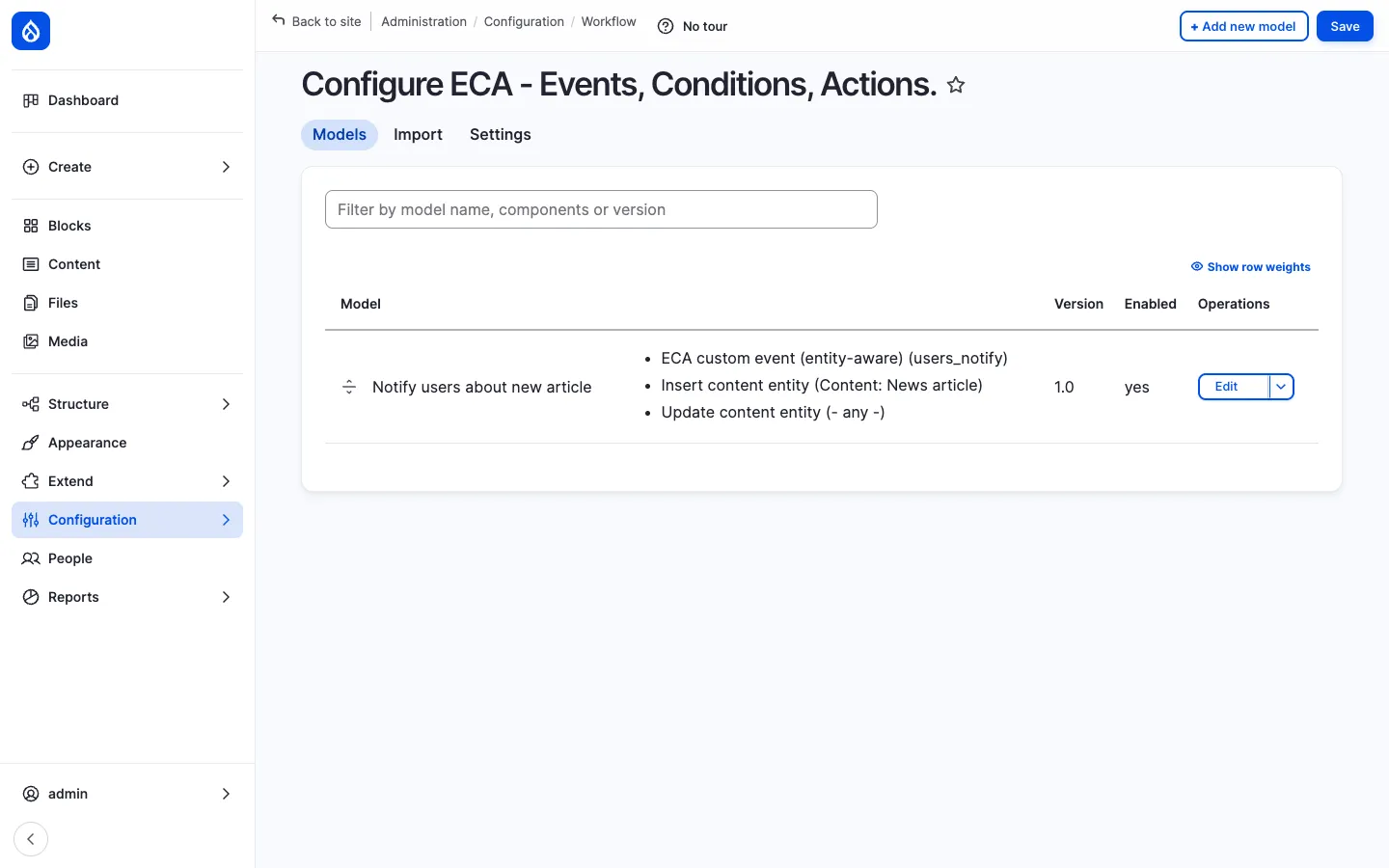
The bundled openintranet recipes ship a small set of ECA models that demonstrate the engine — for example, the Notify users about new article model below sends an email to all users when a News article is inserted or updated.
Components
Section titled “Components”The Models list
Section titled “The Models list”/admin/config/workflow/eca is the management page. Each model has:
- A machine name (
process_xxxxxxxis the auto-generated default; admins can rename to something readable likenotify_new_article). - A label — the human-readable name that appears in the UI.
- A list of components — the events, conditions and actions the model uses (this gives a quick at-a-glance summary of what the model does).
- A version number — bumped manually each time the admin saves a meaningful change.
- An Enabled flag — disable a model without deleting it (useful for temporary turn-offs and A/B testing).
A search input at the top lets you filter models by name, component or version.
The BPMN modeller
Section titled “The BPMN modeller”Clicking Edit on a model opens the graphical canvas powered by the BPMN.io library:
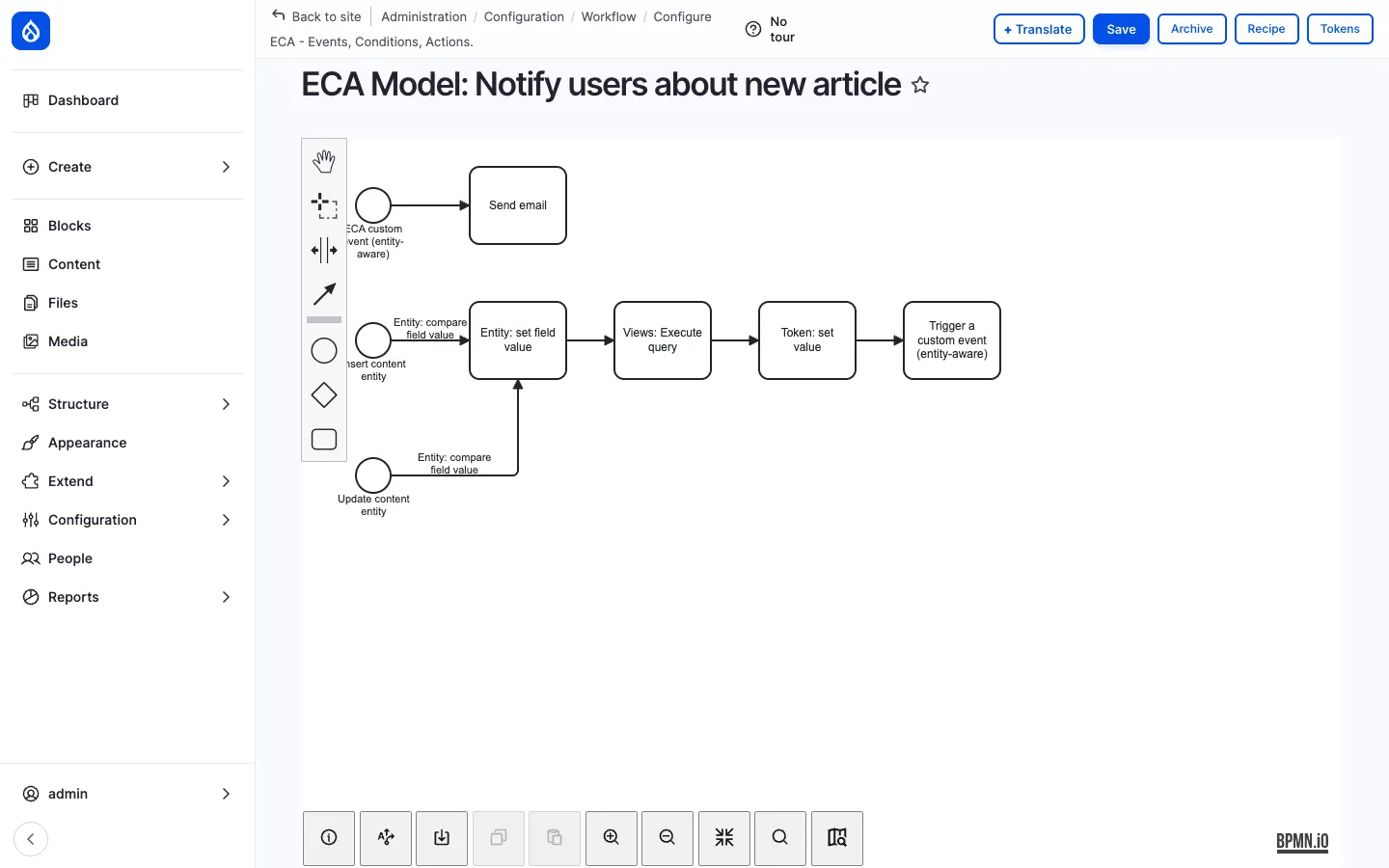
The toolbar on the left provides:
| Tool | Purpose |
|---|---|
| Hand | Pan the canvas. |
| Lasso | Multi-select. |
| Connection | Draw a sequence flow between two elements. |
| Activity (rounded rectangle) | A task — do something. |
| Event (circle) | An event — something happens. |
| Gateway (diamond) | A condition / branch. |
| Annotation | Free-form note attached to an element. |
The footer toolbar covers zoom, fit-to-screen, search, undo / redo, and import / export of the underlying BPMN XML — useful for sharing models between sites or version-controlling them in code.
Events — what triggers the flow
Section titled “Events — what triggers the flow”ECA exposes 200+ events out of the box, grouped into:
- Entity events —
Insert content entity,Update content entity,Delete content entity,Entity presave,Entity translation insert, … - User events —
User login,User logout,User register,User update,User cancel, … - System events —
Cron,Form alter,Route access,Theme negotiate,Mail send, … - Custom events — admins can declare their own named events (e.g.
users_notify), thenTrigger a custom eventfrom elsewhere — the canonical pub-sub pattern, in BPMN. - Module-specific events — Webform (
Webform submit), Comment (Comment insert), Group (Group membership change), Path (Alias create), …
Each event carries the related entities into the flow so subsequent tasks / conditions can read its title, body, author, and so on.
Conditions — should the flow continue?
Section titled “Conditions — should the flow continue?”ECA exposes 200+ conditions that gate sequence flows:
- Entity —
Entity has bundle,Entity is published,Entity has field value,Entity is new, … - User —
User has role,User is owner,User has permission,User is active, … - Field comparison —
Entity: compare field value(used in the screenshot above),Token: compare values,Token: matches regex, … - Time —
Time is between,Day of week is,Cron has not run for N hours, … - System —
Module is enabled,Path is,Language is,Page is admin, …
Conditions plug into BPMN gateways — diamonds — which then branch the sequence flow into yes / no paths.
Actions — what to do
Section titled “Actions — what to do”ECA exposes 400+ actions — every Drupal action plus dozens of ECA-only ones:
- Entity — Create entity, Update entity, Delete entity, Publish / unpublish, Set field value, Add to taxonomy, Save entity, Clone entity, …
- Notifications — Send email, Send Drupal message, Send chat message (Slack / Teams / Mattermost), Trigger another ECA event, …
- HTTP — POST / GET to remote URL, Read JSON response, Parse XML, …
- Tokens — Set token, Concatenate tokens, Read token from entity, …
- Views — Execute view, Read view results into a token (used in the screenshot above), …
- Files — Read file, Write file, Move file, …
- Workflow — Set moderation state, Apply workflow transition, …
- Maths — Increment counter, Compare numbers, …
- Custom — A site builder can register their own action with a
#[Action]attribute and it appears in the ECA palette automatically.
Sequence flows
Section titled “Sequence flows”Tasks, events and gateways are connected by arrows (sequence flows). Each arrow can have a label (shown in the screenshot — Entity: compare field value) which is the condition that must be true for the flow to follow that path.
Multiple arrows can leave the same gateway — the labels distinguish which path runs in which case (e.g. Entity: is published → branch A, else → branch B).
Save, version, archive, recipe
Section titled “Save, version, archive, recipe”The toolbar at the top right of the editor provides:
- + Translate — Translate the model’s labels into other languages (so the same model serves a multilingual site).
- Save — Persist the BPMN diagram to config storage.
- Archive — Snapshot the current model into a versioned archive.
- Recipe — Export the model as a Drupal recipe (so it can be redeployed on another site, version-controlled, or shared with the community).
- Tokens — Show the available token tree (entity fields, system tokens, user tokens, etc.) for use in action settings.
Sub-processes
Section titled “Sub-processes”Complex flows can be split into sub-processes — a single rounded rectangle that opens its own sub-canvas when double-clicked. A sub-process can be called from any other model, so common patterns (e.g. send the standard “your request is being reviewed” email) become reusable.
Tokens everywhere
Section titled “Tokens everywhere”Every action’s settings form (subject of an email, body of a chat message, value to write to a field, URL to call) accepts Drupal tokens — [node:title], [user:mail], [site:name], [current-date:long], plus ECA-specific tokens ([event:entity], [event:trigger], [arg:0]). The token browser is available everywhere a setting accepts text input.
Real-world examples
Section titled “Real-world examples”| Model | What it does |
|---|---|
| Notify users about new article (bundled) | When a News article is inserted or its notify_all_users_about_new flag is set, query all active users via a view, set the recipient token, and send an email to each one. |
| Auto-archive stale events | Every night, find events older than 90 days and unpublish them. |
| Comment moderation | When a comment is posted, send it to a moderation queue if the author has fewer than 5 approved comments. |
| Onboarding workflow | When a user is created, set their default groups, send a welcome email, schedule a 7-day-follow-up email. |
| Approval workflow | When a Page is saved, route to the manager for approval based on the editor’s department. |
| External integration | When a webform is submitted, POST the data to Slack / Salesforce / ServiceNow / Jira. |
| Engagement nudge | When a Must Read item is unread for >7 days, send a reminder. |
These are all YAML-only — no module, no .php file, no deploy.
Integration with other features
Section titled “Integration with other features”- News, Pages, KB, Events, Documents, Comments — every entity event hooks into ECA. Common patterns: notify on publish, auto-tag, route to approval.
- Webforms —
Webform submitis an ECA event; submissions can fire any flow. - Messenger — ECA actions can call the Messenger broadcast service, so a workflow like “new HR policy → notify all of office X” is a 3-node BPMN diagram.
- AI assistant — ECA can call the AI module’s generate action — useful for summarise on save, translate on save, generate alt text on image upload.
- Multilingual — Models can be translated; tokens resolve in the active language.
- Access Control & Groups — Conditions can read group membership; actions can change it. Workflows like “add the user to the Berlin group when their office is set to Berlin” are trivial.
- Recipes — Any model can be exported as a recipe and shipped with a custom module / site.
- Backup & Migrate — The whole ECA configuration is part of the standard config export, so it backs up with the rest of the site.
Permissions
Section titled “Permissions”| Permission | Default role(s) |
|---|---|
| Administer ECA models (create / edit / delete / save) | Administrator |
| View ECA models (read-only) | Administrator |
| Use the BPMN.io editor | Administrator |
| Trigger custom ECA events from a controller | Configurable (depends on the event’s exposed permission) |
ECA models themselves run with the same permissions as the user that triggered the start event (or as the cron user when the event is a cron event), so an action will not bypass Drupal’s normal access checks unless the admin explicitly sets the model to run as administrator.
Modules behind it
Section titled “Modules behind it”- ECA — Events, Conditions, Actions — the engine, the action catalogue, the conditions catalogue
- BPMN.io — the JavaScript modeller wrapped in a Drupal module
- ECA sub-modules:
eca_base,eca_content,eca_user,eca_form,eca_views,eca_workflow,eca_misc,eca_log— each adds events / actions / conditions for one Drupal subsystem (install only those you need)
Learn more
Section titled “Learn more”- News and Articles — heaviest user of ECA in the bundle (notify-on-publish)
- Messenger — the natural action target for cross-channel notifications
- Webforms — submissions are first-class ECA events
- AI Assistant in CKEditor — combine with ECA for summarise / translate on save automation
- ECA module on drupal.org — the full event / condition / action catalogue
- BPMN.io — the underlying open-source BPMN modeller