

Multilingual
Open Intranet runs in any number of languages out of the box. The platform leans on Drupal core’s four multilingual modules — Language, Interface translation, Content translation and Configuration translation — and adds a language switcher dropdown that ships with the default theme.
The result is a site where the interface (every label, button, error message, menu item), the content (each News article, KB page, page, event, document) and the configuration (block titles, view headers, field labels, system emails) can each be translated independently — and where every visitor lands on the page in the language they prefer.
What it is
Section titled “What it is”By default the platform installs English only. Adding a new language is a single admin click — it imports the language, downloads its interface translation pack from localize.drupal.org automatically, and wires it into every multilingual surface on the site.
Adding Polish, German, French or any of the other 100+ languages Drupal supports is a ~30-second operation. The day-to-day workflow afterwards is:
- Pick the languages the company needs.
- Decide which content types and fields should be translatable.
- Translators fill in the per-language values from the Translate tab on each item.
Components
Section titled “Components”The Languages page
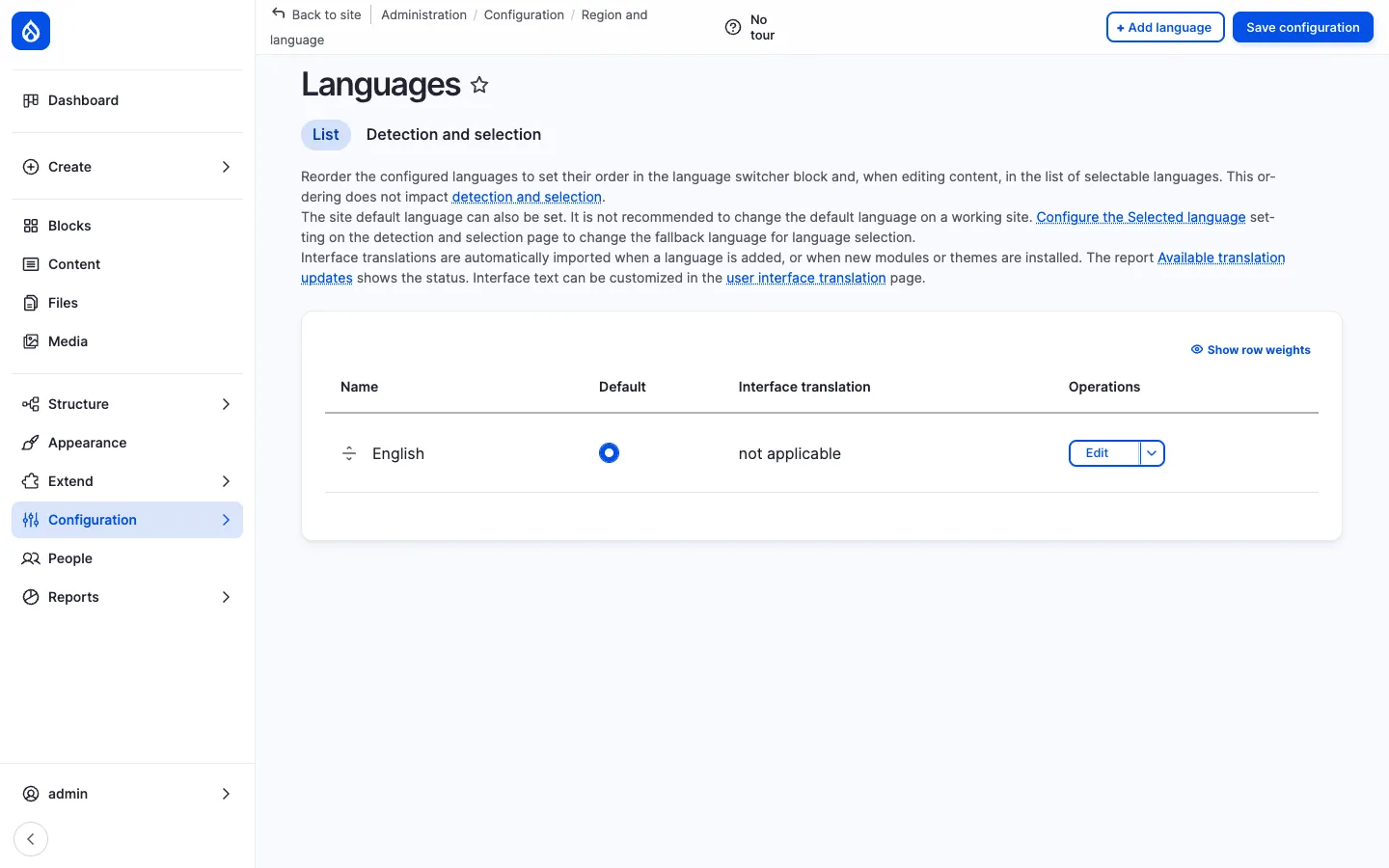
Section titled “The Languages page”/admin/config/regional/language is where languages are added, ordered, and marked as default. Each row shows:
| Column | Purpose |
|---|---|
| Name | The language’s display name. |
| Default | A radio that picks the site default. |
| Interface translation | Status of the imported .po file (or not applicable for English). |
| Operations | Edit, delete, reset the language. |
Drag-and-drop reordering changes the order in which the languages appear in the switcher block and in the Translate tab.
The Detection and selection sub-tab controls how a request gets a language — by URL prefix (the recommended default), by domain, by browser Accept-Language, by user preference, by session, by cookie. Multiple methods can run in priority order.
Interface translation
Section titled “Interface translation”Once a non-English language is added, Drupal automatically downloads the matching interface translation pack. Interface means everything written in code — button labels, form errors, watchdog messages, the standard menu items, the admin UI itself.
The /admin/config/regional/translate page lets administrators override any string for the site (e.g. translate “Bookmarks” as “Mes favoris” rather than “Signets”). Strings can also be edited inline directly on the page using the Locale UI.
Content translation
Section titled “Content translation”/admin/config/regional/content-language is the per-bundle, per-field opt-in for content translation:
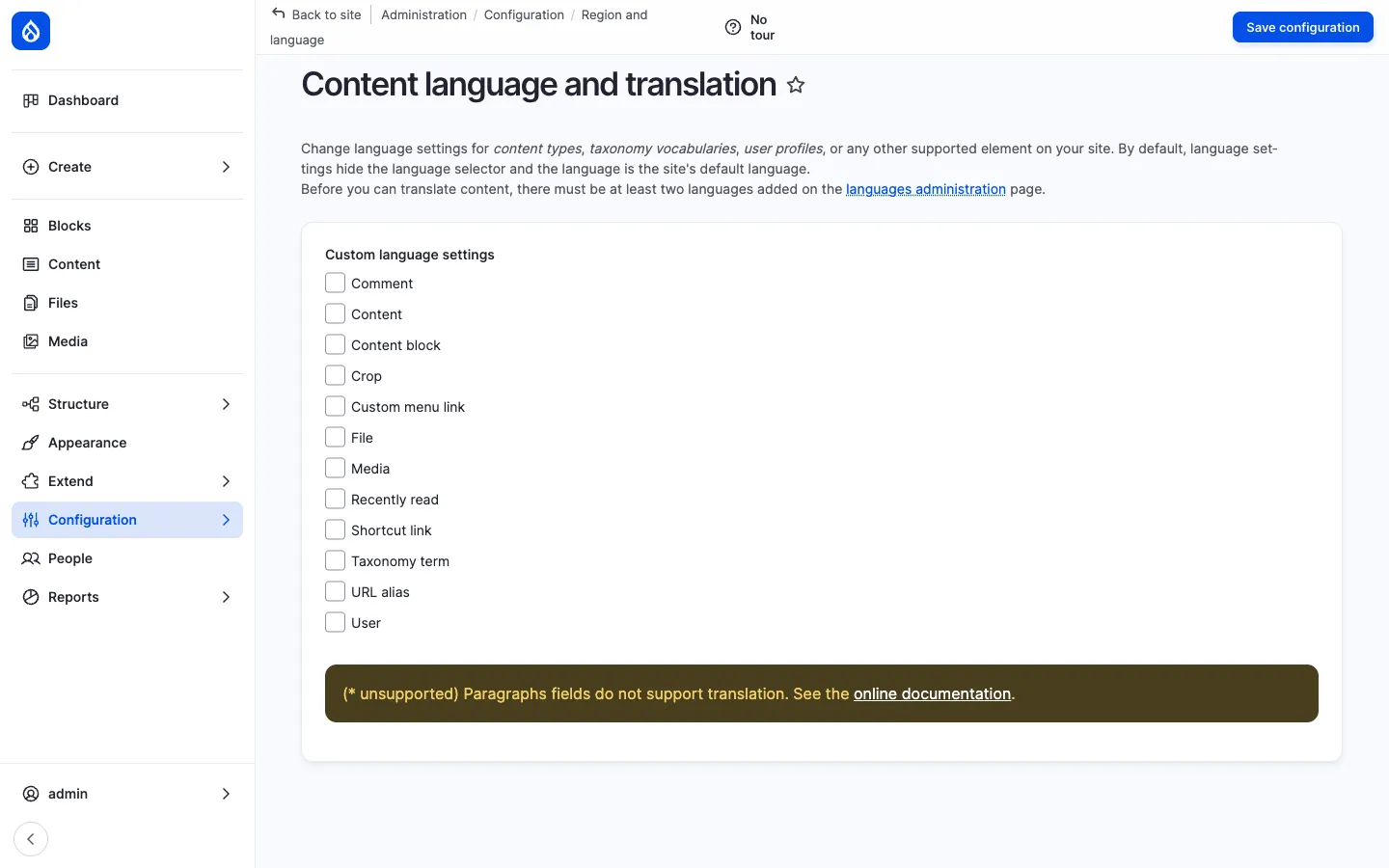
For each entity bundle (News article, Page, Document, KB page, Event, …) the admin chooses:
- Whether the bundle is translatable at all.
- Which fields are translated per language (e.g. Title, Body, Image alt text).
- Which fields are shared across languages (e.g. Author, Created date, URL alias).
- The default language and whether to publish translations independently.
Once enabled, every item gets a Translate tab with one row per language. Click Add on a language row to open a copy of the edit form pre-populated with the source values — fill in the translated strings and save. Each translation is independently revisioned, can be in a different moderation state, and can have a different URL alias.
Configuration translation
Section titled “Configuration translation”/admin/config/regional/config-translation lists every translatable configuration object — block titles, view headers, view exposed-form labels, field labels, system emails, contact-form messages — and lets administrators add per-language overrides. This is what makes the difference between a site that “looks translated” (interface only) and a site that genuinely speaks the language of its users.
Language switcher
Section titled “Language switcher”The default theme places a language switcher dropdown in the page header. It uses the Dropdown Language module so that the current language is shown as a flag/code button and the other languages collapse into a dropdown — keeping the header tidy even with 6+ languages enabled.
Clicking a language reloads the current page on its translated URL (e.g. /news/welcome → /de/news/welcome).
URL pattern
Section titled “URL pattern”Multilingual URLs use the path prefix detection method:
/news/welcome ← English (default)/de/news/welcome ← German translation/fr/news/welcome ← French translation/pl/news/welcome ← Polish translationPathauto generates the same alias on each language; an admin can override per language from the URL alias widget on the translation form. Switching language on a single item routes through the Translation tab so the user always lands on the correct localised URL.
What’s translatable
Section titled “What’s translatable”| Surface | Translation type |
|---|---|
| Admin UI (toolbar, forms, error messages) | Interface translation (.po import) |
| Menus & menu links | Configuration translation |
| Block titles & block content | Configuration / Content translation |
| Views: page title, header, footer, exposed labels | Configuration translation |
| Field labels & help text | Configuration translation |
| News articles, Pages, KB pages, Events | Content translation (per-field opt-in) |
| Documents (title, description, file alt) | Content translation |
| Taxonomy terms (categories, tags, departments) | Content translation |
| User profile fields (where appropriate) | Content translation |
| System emails, contact forms | Configuration translation |
Integration with other features
Section titled “Integration with other features”- News, Pages, KB, Events, Documents — All Open Intranet content types can be turned multilingual through the Content language settings.
- Search — Each language has its own indexed content; the Search API view filters results by the current language.
- Messenger — A future channel plugin can pick the right per-recipient language by reading the recipient’s
preferred_langcode. - Pathauto + Redirect — Per-language URL aliases for SEO-friendly translated routes.
- AI assistant — The CKEditor AI assistant can be prompted to translate the current selection or to draft the translated version of an article.
Permissions
Section titled “Permissions”| Permission | Default role(s) |
|---|---|
| Translate any entity | Translator (custom role) + Administrator |
| Administer languages | Administrator |
| Administer content translation | Administrator |
| Administer configuration translation | Administrator |
| Translate user-edited configuration | Administrator |
| Translate interface text | Administrator |
Modules behind it
Section titled “Modules behind it”Drupal core:
language— language definitions, switcher block, detectionlocale— interface translation import / overridecontent_translation— per-field, per-bundle content translationconfig_translation— translatable config objects (blocks, views, etc.)
Contrib:
- Dropdown Language — clean dropdown switcher
- Pathauto — per-language URL aliases
- Redirect — clean redirects when an alias changes
Learn more
Section titled “Learn more”- News and Articles, Knowledge Base, Pages, Events, Documents — every content type can opt into translation
- Search — per-language search results
- Drupal’s multilingual handbook