

Platform & Admin tools
Open Intranet ships with a curated set of small admin tools that cover the long tail of “oh, we also need this on a serious intranet” features. Each one is a few clicks to use and a few minutes to configure, so they are documented together rather than as separate pages. They are:
- Backup & Migrate — On-demand and scheduled backups of the database (and, when needed, files / config).
- Auto Logout — Per-role idle-time logout for security-sensitive roles.
- Coffee — A Cmd+K command palette to jump anywhere on the site.
- Simple XML Sitemap — SEO-friendly sitemap generation for indexed pages.
- Theme Switcher — Apply different themes per role, language or path.
- Masquerade — Switch into another user’s session (for support / debugging).
- Diff — Side-by-side comparison of any two revisions.
Backup & Migrate
Section titled “Backup & Migrate”/admin/config/development/backup_migrate is the central admin page. The tool exposes five tabs — Backup, Restore, Saved Backups, Schedules, Settings:
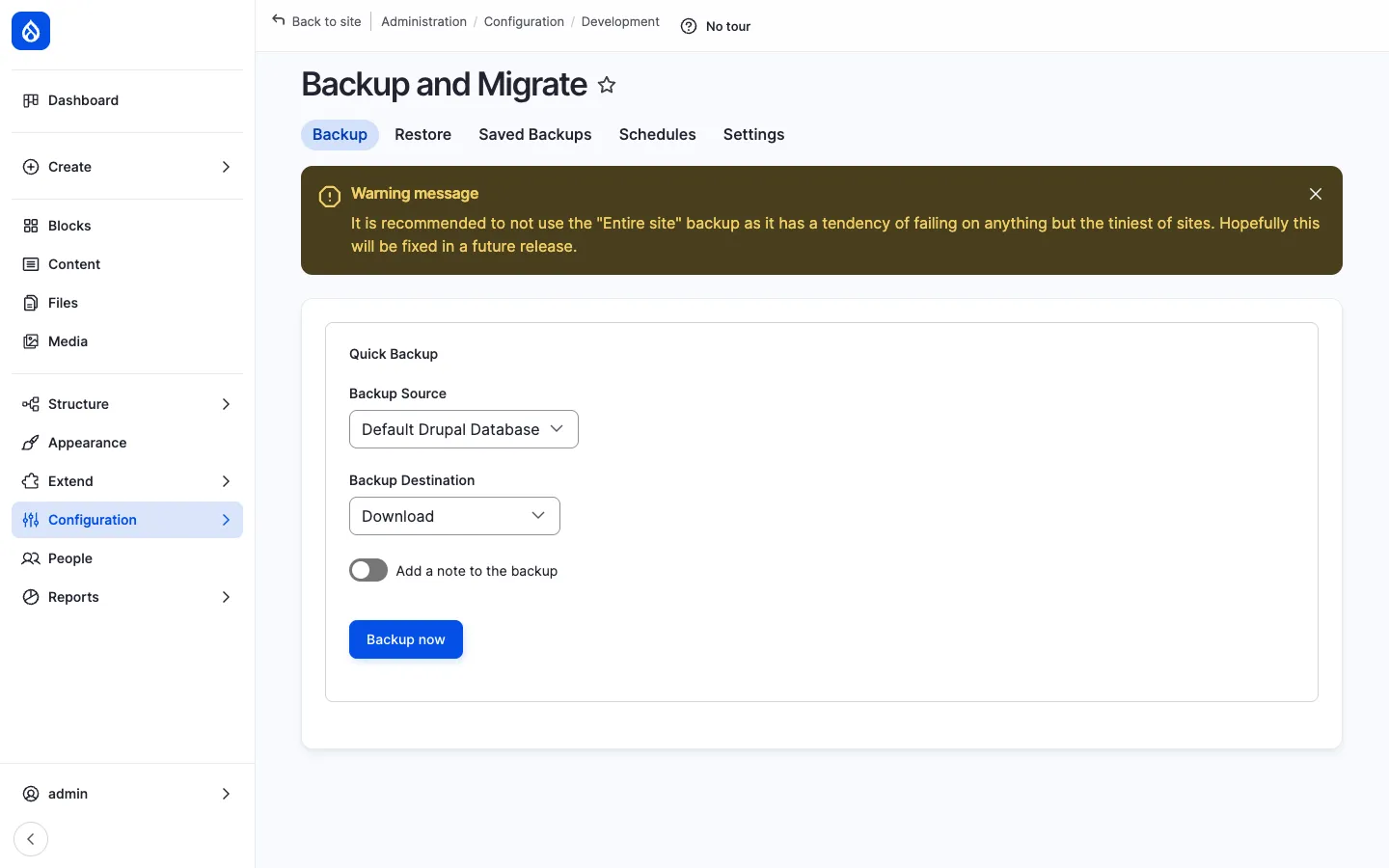
- Backup — One-click create a backup. Pick a source (the Drupal DB, a folder on disk, the public files folder, the private files folder) and a destination (download to your browser, save to the server, push to S3 / Dropbox / Google Drive / FTP).
- Restore — Upload a backup file or pick from saved backups.
- Saved Backups — Manage backups stored on the server. Delete, restore, download.
- Schedules — Create cron-driven schedules (“daily at 02:00, keep last 14, push to S3”).
- Settings — Compression (gzip / bzip2 / zip), exclude tables (cache, sessions), notifications by e-mail.
The tool’s own UI warns not to use the Entire site backup mode for anything but the smallest sites — for production sites a database-only backup plus a separate file-system backup is the standard approach.
Auto Logout
Section titled “Auto Logout”Auto Logout (drupal/autologout) ships in composer.json and is enabled in production deployments where regulated data is involved.
When enabled, it adds a per-role idle-time logout policy at /admin/config/people/autologout:
- Per-role timeout — Different roles can have different timeouts (e.g. 60 minutes for Authenticated user, 15 minutes for HR officer).
- Inactivity warning — A countdown dialog appears N seconds before logout with a Stay logged in button.
- Whitelisted paths — URLs that should not extend the timer (e.g. an iframe / embed page).
- Cross-tab — Activity in one browser tab keeps every tab logged in.
For an intranet that holds sensitive HR / finance data this is the single most important setting to tune up after the initial install.
Coffee — command palette
Section titled “Coffee — command palette”Coffee is a small JavaScript command palette: press Alt+D (or Alt+Ctrl+D on Mac, configurable) and a fuzzy-search input pops up. Type the first few letters of any admin page, content title, taxonomy term or user — Coffee jumps directly there.
It indexes all the admin menu items and surfaces them with a single keystroke. For an editor working through many pages, this saves dozens of clicks a day.
The settings page at /admin/config/user-interface/coffee lets the admin add custom shortcuts (e.g. site logo → /admin/config/system/site-information) and pick which menus / content types feed the index.
Simple XML Sitemap
Section titled “Simple XML Sitemap”Simple XML Sitemap generates an /sitemap.xml that lists every indexed page on the site. The admin page at /admin/config/search/simplesitemap shows the configured sitemaps:
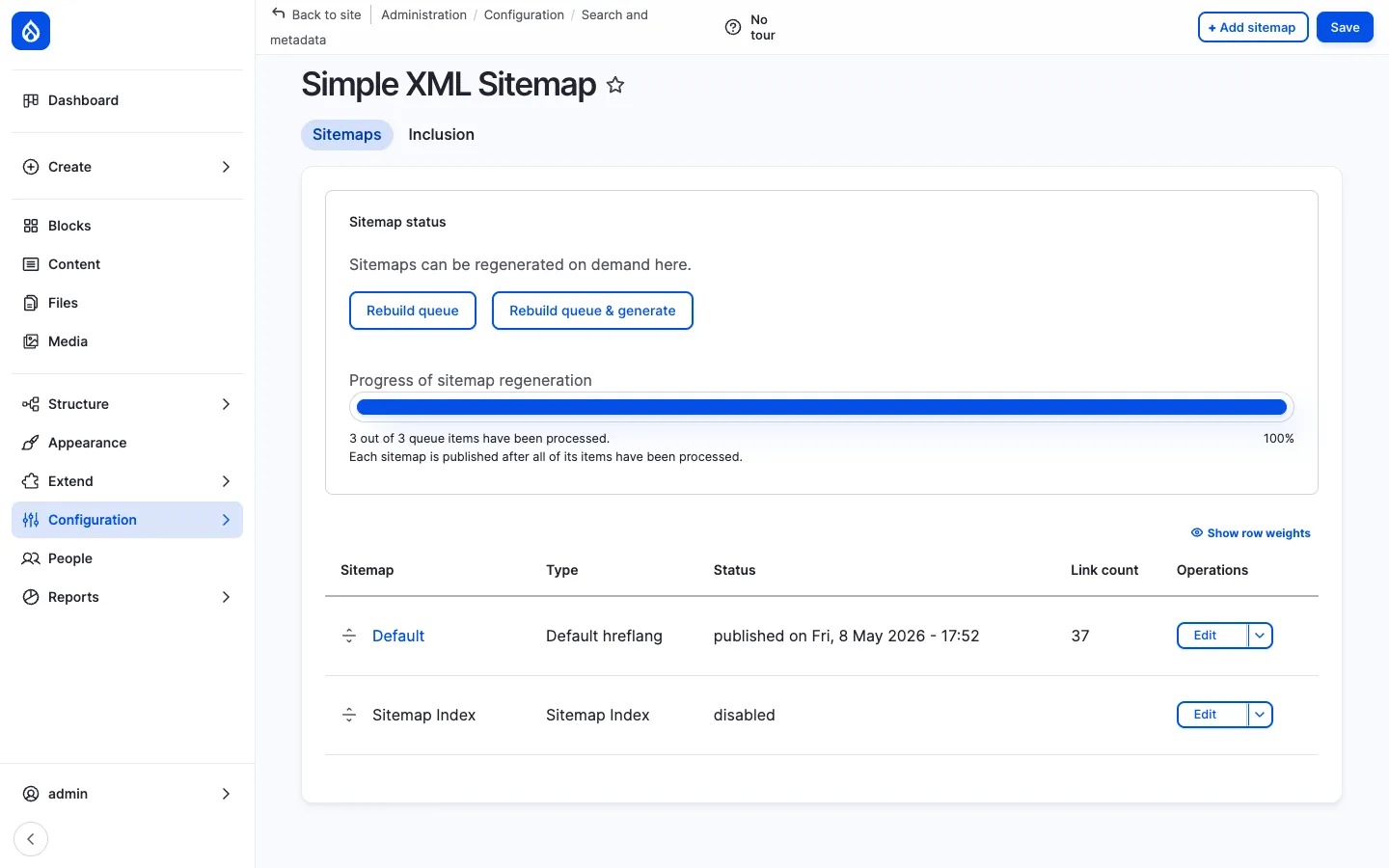
For an intranet the sitemap is rarely consumed by a public crawler, but it is still useful for:
- Internal search engines (Solr / Elasticsearch) that crawl the URL list.
- Health checks (“how many pages do we publish?”).
- Migrations and link-checking.
Per content-type / per-bundle the admin chooses whether to include a bundle, and at what priority and change frequency. The sitemap regenerates on cron (or on-demand from the admin page).
Theme Switcher
Section titled “Theme Switcher”The Theme Switcher module adds rule-based theme assignment. The admin page at /admin/config/system/theme_switcher lists the configured rules — each rule pairs a selector (URL path, role, language, content type) with a theme to render with.
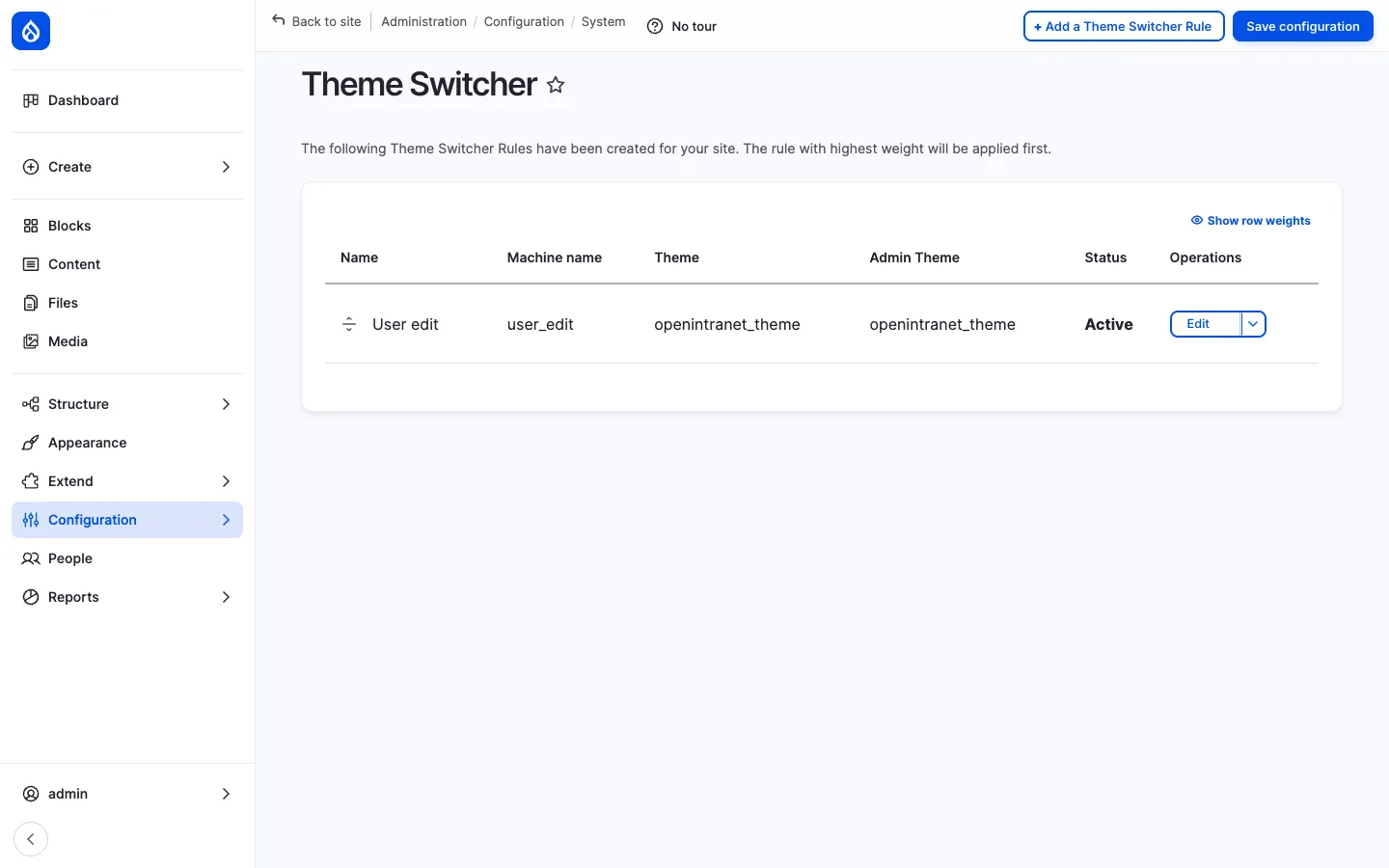
Common use-cases:
- A dedicated theme for
/admin/*(e.g. Gin Admin) and the default frontend theme everywhere else. - A white-label theme for a specific tenant URL (e.g.
/partners/*uses a partner-specific theme). - A language-specific theme for an Arabic or Hebrew language version (RTL support).
Rules have priorities so that overlapping rules resolve deterministically.
Masquerade
Section titled “Masquerade”Masquerade lets an administrator switch into another user’s session for support and debugging. From the user list (/admin/people) or from a user’s profile page, click Masquerade as. The admin’s interface re-renders as that user — same blocks, same access, same dashboards.
A persistent Unmasquerade badge sits in the header so the admin knows they are masquerading and can switch back with one click.
This is the canonical “can you reproduce the bug as me?” tool: when a user reports a missing page or a permission issue, the admin masquerades, sees exactly what the user sees, fixes the misconfiguration and switches back.
Permissions are tightly controlled: a Masquerade permission is required, and admins are excluded from masquerading as another admin (so the audit trail is preserved).
The Diff module adds a Compare tab to every revisioned entity. Pick any two revisions, click Compare — the page renders a side-by-side or unified diff with field-by-field colouring (added text in green, removed text in red, edited text highlighted).
It works on every revisioned entity — News, Pages, KB pages, Events, Webform configurations, Documents — so any admin investigating what changed between yesterday and today has a one-click answer.
How they fit together
Section titled “How they fit together”These tools share a small but always-on design philosophy:
| Tool | Primary user | Primary use-case |
|---|---|---|
| Backup & Migrate | Hosting admin | Disaster recovery, pre-update snapshot |
| Auto Logout | Security admin | Compliance — automatic session termination |
| Coffee | Every admin / editor | Faster navigation between admin pages |
| Simple XML Sitemap | Site builder | Internal index and external SEO (when public) |
| Theme Switcher | Site builder | Per-context theming (admin vs frontend, multi-tenant) |
| Masquerade | Support / training | Reproduce a user’s experience |
| Diff | Editor / approver | Audit what changed between two revisions |
Integration with other features
Section titled “Integration with other features”- Backup & Migrate + Cron — Schedules run on Drupal cron (or external systemd / Kubernetes cron via
drush bam-backup). - Auto Logout + Access Control & Groups — Per-role timeouts can be tied to specific high-privilege groups (e.g. HR officer gets 15 minutes, Authenticated user gets 8 hours).
- Coffee + Custom URL aliases — Pathauto-generated aliases are indexed by Coffee, so editors can fuzzy-search by article title.
- Simple XML Sitemap + Multilingual — Generates one sitemap per language, properly linked with
<xhtml:link rel="alternate">. - Theme Switcher + Multilingual — Pair with the Language condition for full RTL theming.
- Masquerade + Engagement scoring — Engagement events recorded while masquerading are correctly attributed (or excluded, depending on configuration).
- Diff + Revisions — Works on every Drupal revisioned entity; pairs naturally with the Revisions tab on News, KB pages, Pages.
Permissions
Section titled “Permissions”| Tool | Permission | Default role(s) |
|---|---|---|
| Backup & Migrate | Perform backups / restore | Administrator |
| Auto Logout | Configure auto-logout | Administrator |
| Coffee | Use Coffee | Authenticated user (configurable per role) |
| Sitemap | Administer sitemap | Administrator |
| Theme Switcher | Administer theme-switcher rules | Administrator |
| Masquerade | Masquerade as any user / role | Administrator |
| Diff | View diffs | Authenticated user (with revision-view) |
Modules behind it
Section titled “Modules behind it”- Backup and Migrate
- Automated Logout
- Coffee
- Simple XML Sitemap
- Theme Switcher
- Masquerade
- Diff
- Drupal core:
system,update
Learn more
Section titled “Learn more”- News, Knowledge Base, Pages, Events — every revisioned content type pairs with Diff
- Multilingual — pairs with Theme Switcher (per-language theme) and Sitemap (per-language sitemaps)
- Access Control & Groups — informs Auto Logout policy and Masquerade permissions