Gouvernance du contenu intranet : un modèle de cycle de vie contre l’obsolescence
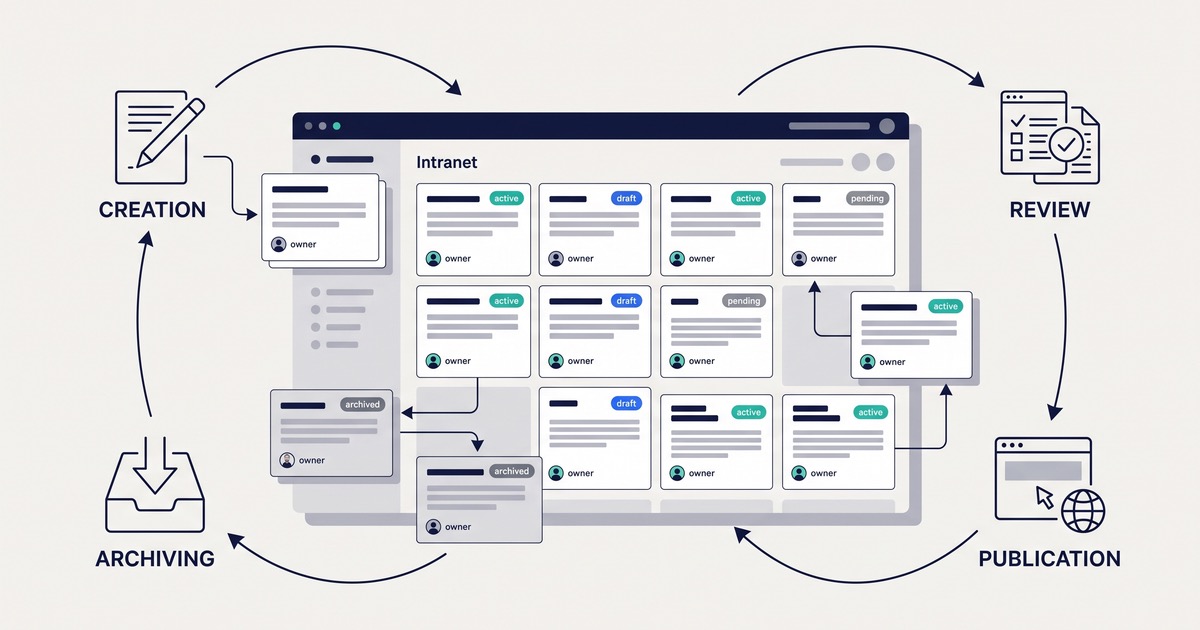
Stale intranet pages waste employee time. An outdated expense policy sends someone through the wrong approval process. Duplicate onboarding instructions leave a new hire wondering which version to trust. Intranet content governance prevents these problems by making ownership, review deadlines, and retirement decisions part of everyday publishing.
The goal is not to make every edit wait for a central communications team. It is to give business teams clear responsibility, automate routine reminders, and intervene when content creates risk.
Build these controls before launch, then use them throughout the intranet’s life. Here is a practical model for keeping pages useful without creating a publishing bottleneck.
In this article:
- Who owns each section and its content after launch?
- What lifecycle should every intranet page follow?
- How often should content be reviewed, and what happens when it expires?
- When should content be merged, archived, or retired?
- How can Drupal automate stale-content alerts?
- How do you enforce standards without slowing publishing?
- How will you know the governance model is working?
Who owns each section and its content after launch?
Every section needs an accountable business owner, and every page needs a named responsible owner and backup. A department mailbox can receive notifications, but it cannot replace individual accountability.
For example, HR might own the benefits section, while a named benefits specialist verifies its pages. An editor can maintain those pages without becoming responsible for deciding whether the benefits guidance is correct.
Separate the responsibilities:
| Role | Responsibility |
|---|---|
| Section owner | Keeps the section useful, resolves ownership gaps, and assigns time for maintenance |
| Page owner | Verifies facts and decides whether to retain, revise, merge, archive, or retire a page |
| Backup owner | Handles reviews when the page owner is unavailable |
| Editor | Updates copy, links, attachments, and page structure |
| Subject-matter approver | Checks substantive changes to sensitive guidance |
| Digital workplace manager | Monitors overdue work, coordinates escalations, and maintains governance rules |
One person may hold several roles in a small organization. The important distinction is between editing a page and being accountable for its accuracy.
Create an ownership register containing the section, page or content group, named owner, backup, approver where required, review interval, and escalation contact. Keep it connected to the content itself where possible, rather than maintaining a separate spreadsheet that drifts out of date.
Make reassignment part of employee departures and role changes. When an owner leaves, route their pages to the section owner for reassignment. Do not silently transfer everything to an already overloaded editor.
What lifecycle should every intranet page follow?
A shared lifecycle gives publishers a repeatable process:
Draft → review → published → scheduled review → retain, revise, merge, archive, or retire.
These are business stages, not necessarily separate publication states in the platform. In particular, a scheduled review should not automatically make an otherwise valid page unavailable.
Define the entry and exit criteria for each stage:
| Stage | Entry condition | Exit requirement |
|---|---|---|
| Draft | An employee need and responsible owner are identified | Required metadata and usable content are present |
| Review | The draft is ready for factual and editorial checks | The owner verifies accuracy and required approvers sign off |
| Published | An authorized publisher approves release | The page remains available until a review or change requires action |
| Scheduled review | A review date arrives or a business event triggers a check | The reviewer records a decision and next action |
| Disposition | The reviewer chooses retention, revision, consolidation, archiving, or retirement | The action is completed and recorded |
For each page, require:
- Owner and backup.
- Section and content type.
- Risk level.
- Last verified date.
- Next review date.
- Expiry date, where applicable.
- A verification record identifying who checked the page and what supported the decision.
Evidence might be a current policy document, confirmation from a process owner, or a successfully tested procedure. “Reviewed” should mean more than opening the page and clicking a button.
Keep review status separate from publication status. A page awaiting a routine check may remain published. A page known to contain incorrect security instructions needs immediate correction or withdrawal, with a route to valid guidance.
Also keep “last edited” separate from “last verified.” Fixing a typo does not prove that the instructions are current.
How often should content be reviewed, and what happens when it expires?
Set review intervals according to the consequences of an error and how often the subject changes. Reviewing every page monthly creates unnecessary work. Reviewing every page annually leaves fast-changing instructions exposed.
Use the following as illustrative starting points, subject to business and legal requirements:
| Content type | Starting review pattern | Additional trigger |
|---|---|---|
| Frequently changing procedures | Quarterly | Process or system change |
| Sensitive policy guidance | Interval agreed with the accountable function | Policy, legal, or regulatory change |
| Stable reference pages | Annually | Organizational change |
| Campaigns and temporary notices | End date set at publication | Cancellation or extension |
| Contacts and team information | Periodic checks plus event-driven updates | Role change or departure |
Date-based reviews are only one safety net. System replacements, reorganizations, policy changes, and ownership transfers should trigger checks before the next scheduled deadline. Identify affected pages using section assignments, tags, and links to source documents.
A review task should ask the owner to:
- Verify facts against the current source.
- Test instructions and links where relevant.
- Check contacts, attachments, and audience restrictions.
- Look for duplicates or conflicting guidance.
- Record the decision, supporting evidence, and next review date.
Distinguish an overdue review from hard expiry
A missed review means verification is overdue. It does not automatically mean the page is wrong.
An expiry date means a defined use period has ended. A registration notice should leave current listings when registration closes, even if its owner has not responded.
For a pilot, you might send a reminder 14 days before review, notify the owner on the due date, and escalate to the backup and section owner after seven overdue days. Shorten those windows for high-risk material. Known incorrect content should trigger immediate action, not wait for the reminder sequence.
Define expiry behavior by content type. Some items should leave current listings; others should be unpublished or archived. Essential guidance should not disappear without valid replacement instructions or an explicit withdrawal notice.
When should content be merged, archived, or retired?
Keeping everything makes employees do the work of separating current guidance from historical material. Use a consistent decision framework instead.
| Decision | Choose it when | Required action |
|---|---|---|
| Retain | Content remains accurate, useful, and distinct | Record verification and the next review date |
| Revise | The employee need remains, but details have changed | Correct the page and obtain required approval |
| Merge | Several pages serve the same need | Choose a canonical page and consolidate useful material |
| Archive | Content is no longer current but has a reference or retention purpose | Apply archive behavior and record retention requirements |
| Retire | Content has no remaining purpose and may be removed | Check dependencies and obligations before removal |
Archiving must change how employees encounter the content. Merely adding an “Archived” label while leaving the page prominent in search is not enough.
Define archive behavior explicitly:
- Remove archived pages from current-content listings.
- Exclude them from default search results where appropriate.
- Provide a separate archive search or filter if employees need historical access.
- Display a visible notice explaining that the content is not current guidance.
- Link to a current replacement when one exists.
- Restrict access where confidentiality or retention rules require it.
Search filtering is not access control. Restricted archives need permission checks on pages and associated files.
Before retirement, check incoming links, navigation entries, attachments, replacement pages, retention obligations, and legal holds. Removing a page from publication is different from deleting its records. A legal hold may prevent deletion even when employees should no longer use the material.
Redirect only to a genuinely equivalent replacement. Otherwise, provide a clear retirement notice or an appropriate unavailable-page response. Sending every old URL to the homepage leaves employees guessing.
How can Drupal automate stale-content alerts?
Automation saves owners from tracking deadlines manually and gives the digital workplace manager a visible backlog.
For a Drupal-based intranet such as Open Intranet, treat this as an implementation pattern to configure and test, not a promise that every capability is available by default.
Store governance data as structured fields
Use account references for owners and backups, date fields for review and expiry deadlines, and controlled values for risk and section.
Store verification records with reviewer identity, date, decision, and supporting notes. This lets teams distinguish an actual review from an unrelated content edit.
Configure editorial states and transitions
Drupal core Workflows and Content Moderation can define editorial states and transitions, such as draft, needs review, and published. Transition permissions control which roles can move content through those states.
They do not, by themselves, provide the entire date-driven reminder and expiry process. Scheduled notifications, escalation logic, and expiry actions require additional configuration, suitable contributed modules, or custom code.
When selecting modules, check compatibility with the deployed Drupal version, maintenance status, and security coverage.
Build worklists and scheduled checks
Use Views-based lists to show:
- Reviews approaching their deadline.
- Overdue pages grouped by risk and section.
- Pages without an active owner.
- Expired content awaiting an action.
- Archived content approaching a retention decision.
A scheduled process can identify due items and queue notifications to owners and backups. Record which notifications have been sent so repeated runs do not create duplicate reminders.
Make every alert actionable. Include the page title, deadline, risk level, review link, and required decision. Batch routine reminders into a digest, while routing urgent items separately.
Monitor the automation itself
A failed scheduled run should not make the dashboard appear healthy.
Log completed runs, check notification delivery failures, and assign someone to investigate missed runs. Test owner absences, deactivated accounts, repeat executions, and expiry actions.
Verify search behavior too. Publishing changes may require index updates, and notifications should not expose restricted page details to unauthorized recipients.
How do you enforce standards without slowing publishing?
Use a small number of firm controls at publication, then vary approval requirements by risk.
Require ownership, risk classification, and review dates before publication. Content-type defaults can reduce repetitive entry. For example, a temporary notice can require an end date, while a reference page can receive a suggested review interval for the owner to confirm.
Defaults should save typing, not replace accountability. Avoid assigning every new page permanently to whoever created it.
Use two broad approval paths:
- Routine updates: Authorized owners or editors can correct links, contacts, and wording within their permission scope.
- Substantive or sensitive changes: Changes to policy, security instructions, employee rights, or regulated guidance go to designated approvers.
Define examples of each path so publishers do not have to interpret vague rules. Enforce critical requirements through permissions and validation, not training alone.
Give publishers a short checklist:
- Is the information accurate and supported by a current source?
- Are the owner and backup correct?
- Is the next review date appropriate?
- Does this duplicate another page?
- Have required approvals been recorded?
Create an urgent publishing exception for situations where waiting would cause harm or block essential work. Require a named authorizer, a recorded reason, and a follow-up review deadline. Preserve revision history and approval records.
An exception should be traceable and temporary, not an informal way around the process.
How will you know the governance model is working?
Measure whether governance work happens and whether employees encounter fewer content problems. Page counts alone will not tell you either.
| Measure | Definition |
|---|---|
| Ownership coverage | Percentage of in-scope published pages with an active named owner and backup |
| On-time review rate | Reviews completed by their deadline, divided by reviews due in the reporting period |
| Overdue backlog by risk | Published pages past their review deadline, grouped by risk and overdue age |
| Unresolved expiry actions | Items past expiry whose configured removal, unpublishing, or archive action has not completed |
| Confirmed inaccuracies | Reported content errors still awaiting correction, grouped by severity and age |
Agree on the scope and reporting period before comparing teams. Preserve original review deadlines so moving a date forward does not count as an on-time completion.
Separate approaching deadlines, overdue verification, and confirmed inaccuracies. These represent different levels of urgency. Give the highest-risk backlog a named escalation owner.
Hold a recurring operational review to assign actions, identify overloaded owners, and adjust reminder timing or review intervals. Combine the dashboard with employee feedback: Are people reporting conflicting instructions? Are support teams repeatedly sending employees to a page that search fails to surface?
Do not extend review intervals simply to make the backlog smaller. Adjust them when the evidence supports a lower review frequency.
Check readiness before launch
Before publishing the new intranet, confirm that:
- The ownership register is complete, with named backups and escalation contacts.
- Lifecycle stages, approval paths, and retirement rules are agreed.
- Review dates are populated for migrated and newly created content.
- Expiry actions are defined by content type.
- Archive behavior, search visibility, and access restrictions are tested.
- Reminders, escalations, and failed-run alerts reach the right people.
- Owners know how to record a review and transfer responsibility.
A launch deadline should not become an excuse to migrate ownerless pages. Resolve ownership first, or hold that content back until someone accepts responsibility.
Ready to start?
Start with one high-use section, such as onboarding or IT support. Assign owners and backups, classify risk, populate review dates, and test one complete cycle from reminder to recorded decision. Use what you learn before expanding across the intranet.
Open Intranet is an Open Source intranet built on Drupal by Droptica. Talk with the Open Intranet team about turning your agreed governance model into Drupal fields, workflows, worklists, and scheduled actions, with a clear distinction between existing capabilities and the configuration or development your process needs.