Intranet requirements gathering: how to run interviews and workshops

Reduce rework by finding out what employees need before the intranet build begins. Intranet requirements gathering helps you replace scattered feature requests with evidence about employee tasks, obstacles, and business impact.
The challenge is getting beyond wishes such as “make search better” or “give everyone a dashboard.” Interviews uncover the underlying problems. Surveys check how widely those problems occur. Workshops help the right people agree on what matters and why.
This tutorial walks you through that sequence, then shows how to turn your findings into personas, journey maps, and a prioritized, testable backlog.
In this article:
- How do you plan an intranet requirements gathering program?
- What should you ask in stakeholder interviews?
- How can a short survey widen employee input?
- How do you turn research into personas and journey maps?
- How do you facilitate a requirements workshop?
- How do you write requirements that can be tested?
- How do you prioritize findings into a backlog?
- How do you validate the backlog before discovery ends?
How do you plan an intranet requirements gathering program?
Start by defining the decisions your research must support. Otherwise, discovery can become a long list of unrelated requests.
A useful scope statement might be:
We need to identify the employee tasks the new intranet must support at launch, the barriers employees face today, and the access and compliance constraints those tasks involve.
Specify the employee groups, locations, and business processes included. Also name what is outside the exercise. Platform selection and implementation planning should stay outside this discovery scope, although research should record constraints that will inform those later decisions.
Build a participant matrix, not just a stakeholder list. Department leaders can explain business obligations, but they cannot replace employees who perform the tasks.
| Participant group | What you need to learn |
|---|---|
| HR and Internal Comms | Recurring questions, publishing needs, policy ownership, and communication gaps |
| IT and security | Identity, device access, integrations, support issues, and security constraints |
| Legal and relevant compliance owners | Confirmed obligations, retention needs, and access restrictions |
| Business unit representatives | Department-specific tasks, handoffs, and operational consequences |
| Employee representatives | Actual behavior, workarounds, findability problems, and everyday constraints |
Across these groups, include remote, frontline, and desk-based employees where relevant. Recruit people with different access needs and levels of digital confidence. Avoid relying only on volunteers who already engage with the existing intranet.
Assign three responsibilities:
- Facilitator: runs sessions and keeps questions neutral.
- Note-taker: captures evidence, uncertainties, and decisions.
- Discovery decision owner: resolves scope and priority disputes or escalates them to the right authority.
Schedule interviews first, a survey after early themes emerge, and workshops once you have evidence to discuss. Allow time for targeted follow-up research.
Prepare a shared evidence log with these fields:
| Source | Employee task | Obstacle | Impact | Current workaround | Unanswered question |
|---|---|---|---|---|---|
| Interview reference | Find the applicable leave policy | Several versions appear current | Employee must ask HR to confirm | Message an HR contact | Who approves and retires policy versions? |
This row is illustrative. Use source references rather than employee names wherever possible. Before collecting notes or recordings, explain the purpose, obtain any required consent, and agree on access and retention rules.
What should you ask in stakeholder interviews?
Interviews are most useful when they reconstruct something that happened, rather than ask people to imagine features they might use.
Use the same core guide across interviews so you can compare findings. A suggested 30- to 45-minute session can cover context, a recent task, obstacles, and a final playback.
For employees, ask:
- What does a typical workday or shift involve?
- Tell me about the last time you needed an HR policy or another piece of internal information.
- What triggered that need?
- Where did you look first, and why?
- How did you decide whether the information was current and applicable?
- What happened when you could not find or trust it?
- Who did you ask, or what workaround did you use?
- What would a successful outcome have looked like?
When appropriate, ask participants to walk through the task using non-sensitive material. Seeing the steps can reveal barriers they have stopped noticing.
For department owners, add different questions:
- Which employee requests recur?
- Which mistakes create operational, legal, or security risk?
- Which information do employees struggle to access?
- Who owns, approves, and updates that information?
- Which obligations are documented, and who can confirm them?
Keep feature suggestions separate from evidence. Replace “Would you use a personalized dashboard?” with “What information do you need when you start your shift?” The second question leaves room for needs that a dashboard might not address.
Probe frequency and impact without creating false precision. If someone says a task takes “about ten minutes,” record it as a participant estimate, not a measured baseline. Ask for supporting examples, such as repeated support requests, when available and permitted.
Close by playing back your understanding:
You can find a leave policy, but you cannot reliably tell whether it applies to your location or is the current version. Is that accurate? What have I missed?
In your notes, distinguish:
- Reported behavior: the participant said they asked HR to confirm a policy.
- Interpretation: unclear approval status may be causing repeat questions.
- Proposed feature: display policy approval information.
That separation keeps an early idea from becoming an assumed requirement.
How can a short survey widen employee input?
Use a survey to check the reach of interview themes, not to ask employees to design the intranet.
Build questions around tasks that surfaced in interviews. Keep the survey short enough for employees to complete during their workday, and test that assumption in a pilot.
For example:
| What to learn | Example question | Response approach |
|---|---|---|
| Task frequency | In the past month, how often did you look for an HR policy? | Never, once, several times, weekly, daily or almost daily |
| Task difficulty | Thinking about the most recent time, how easy or difficult was it to find the policy you needed? | A consistent scale from very easy to very difficult |
| Workarounds | What did you do when you could not find it? | Select all that apply, including “I did not encounter this problem” |
| Main obstacle | Which part of the task caused the most difficulty? | Neutral options based on interview findings |
| Missing context | What else should we understand about this task? | Optional open text |
Include “not applicable” or “I have not done this task” where needed. Use skip logic so employees are not asked to rate tasks they have never performed.
Avoid leading wording such as “How frustrating is our outdated search?” Ask about the task and let respondents describe the difficulty.
Pilot the survey with a small, varied employee group. Ask what they thought each question meant, whether response options were missing, and how much effort completion required.
Collect only segmentation data you will actually use, such as work setting or device access. Explain whether responses are anonymous or confidential. A survey that records identifiable employee accounts should not be presented as anonymous.
When reviewing results:
- Compare participation across employee groups.
- Avoid publishing small-group breakdowns that could identify respondents.
- Treat low participation as a research gap.
- Describe findings as responses from the participating employees, not automatically as the views of the entire workforce.
If frontline employees rarely respond, check whether the distribution channel or device access prevented participation before drawing conclusions.
How do you turn research into personas and journey maps?
Personas and journey maps make research easier to use in decisions. They should summarize evidence, not add fictional detail.
First, group findings by employee task and obstacle. Keep the links back to interview notes and survey results. Themes might include locating approved policies, finding a colleague, or understanding which internal service handles a request.
Create lightweight personas around work context. Useful fields include:
- Goals and recurring tasks.
- Work setting and time constraints.
- Device and account access.
- Accessibility needs.
- Digital confidence, where supported by research.
- Main obstacles and workarounds.
- Evidence references and unresolved assumptions.
An illustrative persona could be “shift-based employee using a shared device.” Its purpose is to make limited access time visible during discussions. It does not need an invented name, photograph, or biography.
Do not assume everyone with the same job title has the same needs. Two employees in one department may have very different devices, languages, or access conditions.
Next, map a priority task. For example, an illustrative journey for finding the current leave policy could look like this:
| Stage | Employee action and touchpoint | Obstacle | Candidate need |
|---|---|---|---|
| Trigger | Employee plans time off | Unsure which policy applies | Identify the policy relevant to their employment context |
| Search | Uses a familiar term in intranet search | Policy uses different terminology | Find information using employee vocabulary |
| Review | Opens a policy page | Approval status is unclear | Recognize the current approved version |
| Confirmation | Messages HR | Must wait for an answer | Verify applicability without a routine handoff |
| Next step | Looks for leave-request instructions | Instructions are separate or missing | Understand where and how to submit the request |
Add the desired outcome: the employee finds the applicable approved policy and knows the next step without needing clarification.
Label any assumptions explicitly. Ask employees represented in the research to review the persona and journey map before the workshop. Their corrections often reveal missing steps or exceptions.
How do you facilitate a requirements workshop?
A workshop should turn research into decisions, not restart discovery as an open-ended brainstorming session.
Send a short evidence pack beforehand: scope, key findings, relevant personas, a priority journey map, and unresolved questions. State the decisions participants need to make.
Invite both people who understand the task and people authorized to resolve relevant trade-offs. If a required decision-maker cannot attend, agree on a route for approval rather than treating the room’s preference as final.
Here is a suggested 90-minute agenda:
| Time | Activity | Expected output |
|---|---|---|
| 10 minutes | Confirm scope and decision rules | Shared boundaries |
| 15 minutes | Review evidence | Agreed findings and visible gaps |
| 25 minutes | Walk through priority journeys | Confirmed obstacles and consequences |
| 20 minutes | Draft employee needs | Candidate requirement statements |
| 15 minutes | Discuss priorities and trade-offs | Provisional priorities with rationale |
| 5 minutes | Confirm actions | Owners and follow-up dates |
Begin the evidence review with silent individual input. Ask each participant to note important obstacles and missing information. Then use round-robin sharing before opening the discussion. This reduces the chance that the most senior or outspoken person frames every decision.
Rewrite feature requests using this pattern:
When [situation], [employee group] needs to [task] so that [outcome].
For example, “We need a homepage widget” might become:
When starting a shift, frontline employees need to identify notices that apply to their location so that they can act on relevant updates.
The widget remains an idea to evaluate later. The need is now clear enough to discuss without committing to an interface.
Use dot voting to reveal preferences, not to make automatic decisions. A requirement affecting a smaller employee group may still be essential because of an access barrier or confirmed obligation.
Keep two visible records:
- Decision log: what was decided, why, by whom, and on what evidence.
- Parking lot: out-of-scope ideas and unresolved questions.
When participants disagree, identify the disagreement. Is it about evidence, business impact, an obligation, or release scope? Give the unresolved question an owner and a follow-up action instead of forcing agreement.
How do you write requirements that can be tested?
A useful requirement describes an employee outcome and makes success observable.
Separate functional requirements, which describe what employees can do, from non-functional requirements, which define conditions or constraints such as accessibility, security, and response time.
Use this template for each backlog item:
| Field | What to capture |
|---|---|
| ID | Stable reference |
| User group and task | Who needs to accomplish what |
| Expected benefit | Time saved, reduced risk, or another concrete outcome |
| Requirement | Behavior or constraint needed |
| Evidence links | Interviews, survey findings, journey steps, or confirmed obligations |
| Acceptance criteria | Observable conditions for passing |
| Dependencies | Content, ownership, access, integration, or other prerequisites |
| Reviewer | Person responsible for checking the requirement |
| Status | Needs research, needs refinement, or ready for delivery |
Consider the transformation from a complaint to a requirement.
Raw finding: “Search is frustrating.”
Task-based requirement: Employees need to find the current approved leave policy using terms they commonly use.
Acceptance example:
Given an employee whose access rights include the applicable leave policy, when they search using an agreed test phrase, then the current approved policy appears within the agreed result range and is visibly identified as current.
Before this item is ready for delivery, define the test phrases, result range, applicable policy, and test employee accounts. An “agreed” threshold that has not actually been agreed is still an open question.
Add criteria for relevant exceptions. For example, a restricted document must not appear in search results for an account without permission. The security owner should confirm what information must remain hidden.
For non-functional requirements, replace vague language with test conditions:
- Response time: specify the interaction, maximum duration, network conditions, expected load, and measurement method.
- Accessibility: specify the agreed standard and conformance level, covered journeys, and evaluation methods.
- Access: specify employee groups, permitted actions, restrictions, and expected behavior when access is denied.
Capture the required outcome without choosing a technical implementation. If a threshold or evidence source is missing, mark the item needs refinement, not ready for delivery.
How do you prioritize findings into a backlog?
Prioritization makes the release boundary explicit. It should explain why one employee outcome must come before another.
Start by merging duplicate requests while retaining all supporting evidence. Preserve meaningful differences in employee context. Finding a policy on a personal laptop and finding it on a shared workplace device may involve the same content but different access constraints.
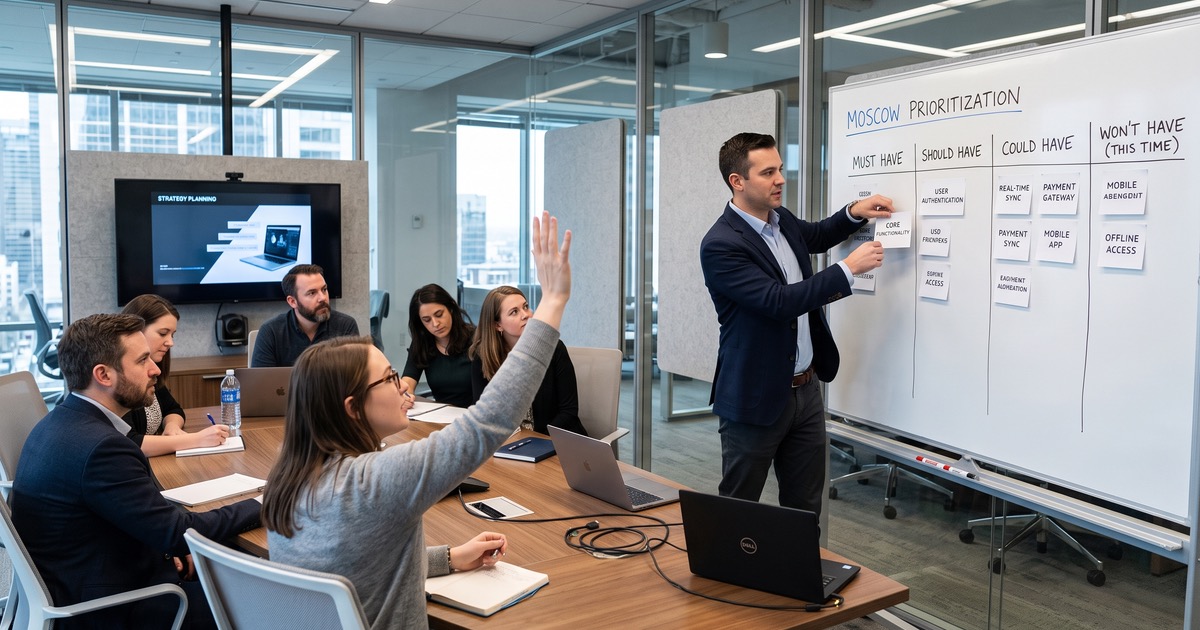
Use MoSCoW against an agreed release scope:
| Category | Meaning |
|---|---|
| Must have | Essential for a critical task or confirmed obligation, with no acceptable workaround |
| Should have | Important, but a temporary workaround is acceptable |
| Could have | Useful, but can be deferred with limited impact on release goals |
| Will not have for this release | Explicitly outside the current release, with a recorded reason |
Test every proposed must-have:
Would omitting this prevent a critical task or violate a confirmed obligation, with no acceptable workaround?
If everything is a must-have, revisit the release goal and ask stakeholders to describe the consequence of omission.
Assess each item against task impact, reach, frequency, risk, dependencies, and indicative effort. Bring in delivery input for rough effort and dependency checks, without turning discovery into detailed implementation planning.
Popularity should not outweigh a confirmed legal constraint or an access requirement affecting a smaller group. Likewise, a frequently mentioned annoyance is not automatically more important than an infrequent but severe failure.
Split broad requests into smaller outcomes. “Fix policy access” might become:
- Find the applicable approved policy.
- Recognize its current status.
- Identify who owns the information.
- Follow the correct next-step instructions.
Record the priority rationale, decision owner, and revisit trigger for each item. A trigger could be new evidence about task impact, confirmation of an obligation, or a change in release scope.
Keep importance separate from certainty. An uncertain requirement may be highly important and need urgent research. It should not quietly become low priority because the team lacks evidence.
How do you validate the backlog before discovery ends?
Validate the backlog against the original employee tasks, not just stakeholder preferences.
Walk representative employees through priority requirements using the journey maps. Ask whether the proposed behavior would let them complete the task, what remains unclear, and which exceptions are missing. Treat this as a check of the requirement, not a substitute for later usability testing.
Ask stakeholders to verify the items within their responsibility:
- HR confirms policy applicability, ownership, and approval needs.
- Internal Comms checks publishing and audience needs.
- IT checks identity, access, integration, and dependency assumptions.
- Legal or relevant compliance owners confirm obligations.
- Accessibility reviewers check that criteria and evaluation methods are explicit.
Before closing discovery, check that every priority item has:
- An evidence source.
- A clear employee task and expected outcome.
- Testable acceptance criteria.
- Known dependencies and a named reviewer.
- A recorded priority rationale.
- Explicit assumptions and unresolved questions.
Return gaps to targeted research. If you do not understand shared-device access, interview employees who use shared devices and the relevant IT owner. There is no need to rerun the entire research program.
Package the handoff so the next team can trace decisions:
- Research summary and participant coverage, including gaps.
- Evidence-based personas and journey maps.
- Prioritized backlog with acceptance criteria.
- Decision log and release boundaries.
- Open questions with owners and next actions.
Finally, agree on a lightweight change process. Assign a backlog owner, review new evidence at a regular cadence, and record changes to priorities and criteria. Discovery should remain traceable without freezing decisions that later evidence may challenge.
Ready to start?
Use the interview prompts, survey questions, workshop agenda, and requirement template to plan your next discovery session. Start with one important employee task, follow the evidence, and expand from there.
If you would like a second perspective on your findings, discuss them with the Open Intranet team. Bring your journey map, draft backlog, or unresolved questions, and we can help you identify what needs clarification before the build begins.